The overlooked slot rule behind M.2 GPU x8 lane sharing
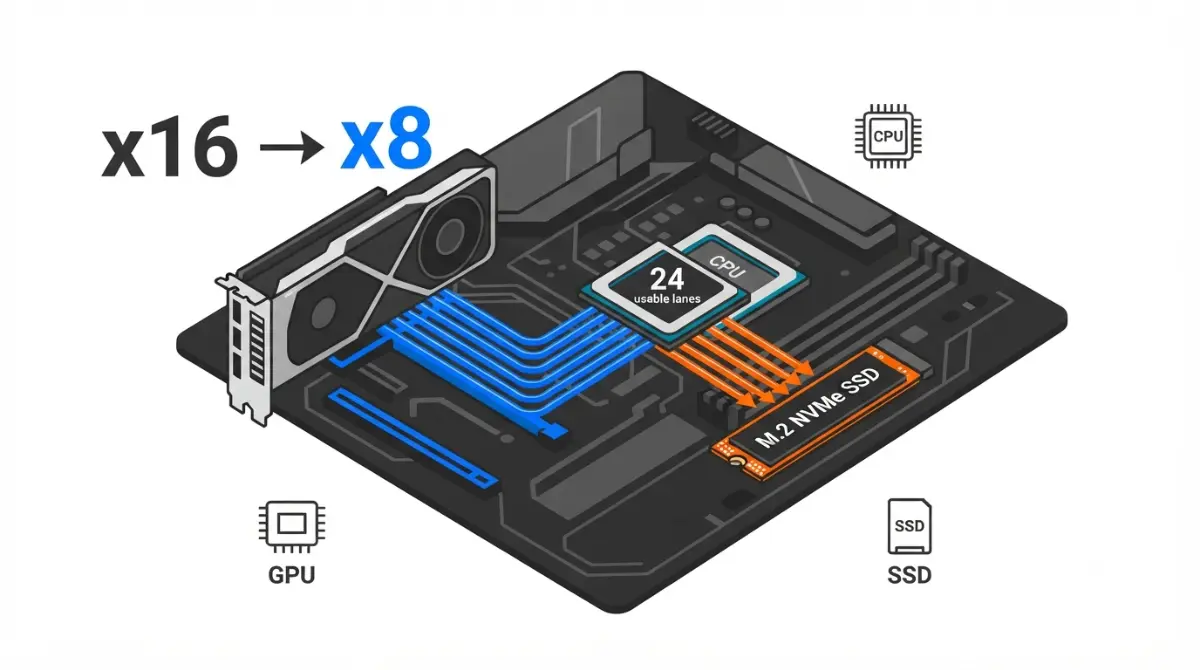
Table of Contents
Your graphics card started reporting x8 where it used to read x16, and the only thing that changed was a new NVMe drive. Nothing is broken. Your motherboard re-routed lanes it was always documented to re-route.
Three situations, three starting points. If the drive is already installed and you want to know what it cost you, the answer is in the section on performance. If you are choosing a board or a second SSD, the slot rules and the buying check come later. If your slot reads x8 with nothing else plugged in, go to the final section.
This covers m.2 gpu x8 lane sharing end to end: why boards do it, where yours discloses it, how to confirm your real link width, and what x8 actually costs.
Your CPU has a fixed lane budget and the board spends it
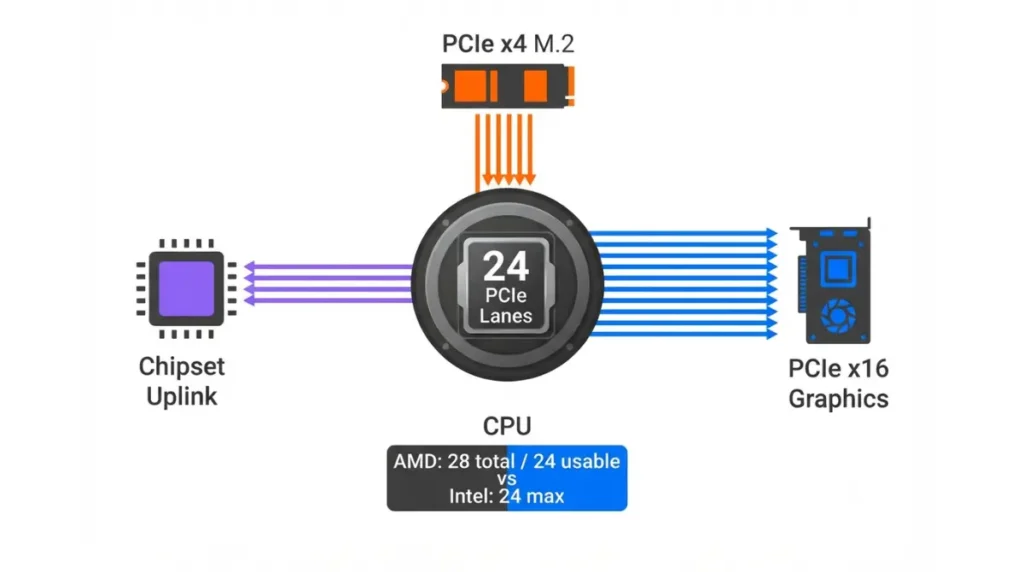
The lanes feeding your graphics slot come from the processor, not the chipset, and there are only so many of them. Board makers expose more connectors than the CPU can feed, because almost nobody populates every one at once.
How many lanes your CPU actually has
| Platform | CPU PCIe lanes | How they are spent | Key detail |
|---|---|---|---|
| AMD Ryzen 9000 (AM5) | 28 total, 24 usable | 4 carry the chipset link; the rest feed graphics and CPU-attached M.2 | AMD lists total and usable as separate figures |
| Intel Core Ultra 200S (LGA1851) | 24 | Split across graphics and M.2 in fixed, published combinations | Intel publishes the legal splits, not just a total |
Source: AMD and Intel product specification pages, read September 2026.
📊 Spec Check: AMD’s specification page for the Ryzen 9 9950X lists native PCIe lanes as 28 total and 24 usable. Intel’s ARK listing for the Core Ultra 9 285K lists 24 maximum lanes and names the supported configurations: 1×16+2×4, 2×8+2×4, and 1×8+4×4.
Why boards ship more slots than lanes
That second Intel configuration is the whole story in one line: 2×8 is a x16 slot that has become two x8 paths. The same arithmetic drives how PCIe lane sharing works across a whole board.
🔍 Why It Works: Lanes are physical wiring, not software. To give you a fast CPU-attached M.2 slot, the board has to take those wires from somewhere, and the graphics slot is the only place with sixteen of them sitting together.
Where your board tells you which slot steals the lanes
This is a per-board fact, so no article can answer it for your motherboard. It can tell you exactly where the answer is printed, and it is printed in four predictable places.
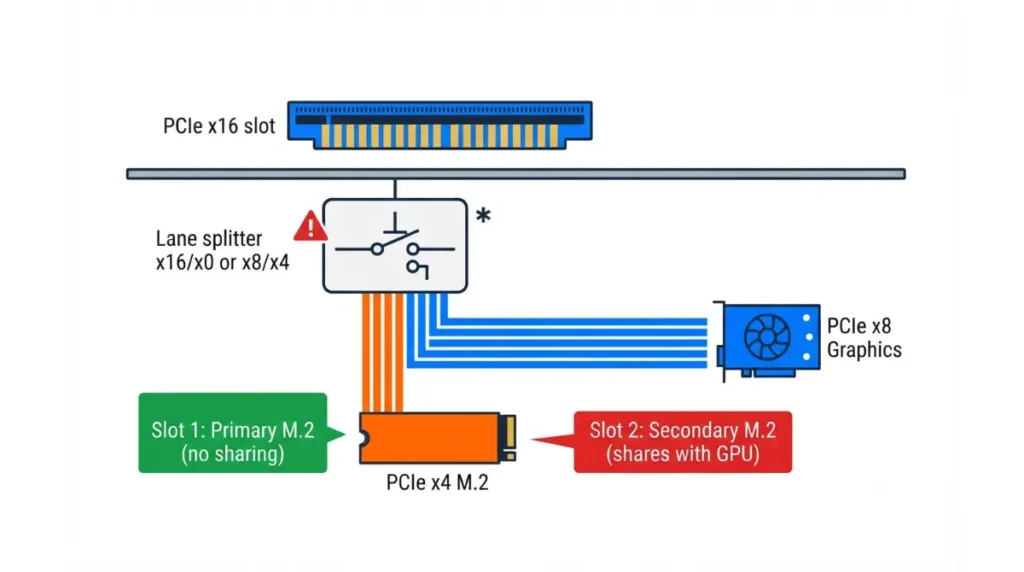
The four places the rule is disclosed
| Where to look | What you are looking for | What it looks like |
|---|---|---|
| Spec page, slot section | A supported-modes line for the primary slot | “x16/x0 or x8/x4” |
| Spec page, storage section | An asterisk beside a specific M.2 slot | A footnote naming slots that share |
| Manual, PCIe configuration table | The full matrix by CPU family | A grid of slot-by-slot outcomes |
| BIOS, PCIe settings | The current negotiated mode | A read-only or fixed link entry |
📊 Spec Check: On MSI’s specification page for the MPG X870E Carbon WiFi, the slot entry reads “Supports PCIe 5.0 x16/x0 or x8/x4” for Ryzen 9000 and 7000 processors, and a footnote states that PCI_E1, PCI_E2 and M.2_2 share the bandwidth, directing readers to the manual’s configuration table.
That footnote is the entire compatibility answer for that board, and it sits below the spec table where it is easy to scroll past. Chipset name settles nothing — two boards on the same chipset wire this differently, which is why the full motherboard compatibility check starts with the model, never the series.
🧩 Compatibility Check: Open your exact board model’s spec page, read every footnote under the Slot and Storage sections, then open the manual’s PCIe configuration table. You are looking for your second CPU-attached M.2 slot by its board label, not by its physical position.
How to confirm the link width your card is really running
Before changing anything, get a reading you trust. A monitoring utility reports the negotiated bus interface for the card, which is the number that matters.
Read it under load
- Open a GPU monitoring utility and find the bus interface or PCIe link line.
- Start a 3D load — a game, or the utility’s own render test — and leave it running.
- Read the line again while the load is running, and note both the generation and the width.
Why your first reading may be wrong
Cards drop to a lower link state when idle to save power, so a desktop reading can understate what you have. The number taken under load is the real one.
💡 Pro Tip: If the line reads x8 at idle and x16 under load, you never had a lane-sharing problem. Half the panic about this symptom comes from reading the figure on an idle desktop.
What running at x8 actually costs in performance
Halving the lane count does not halve performance, because bandwidth depends on generation as well as width. Each generation doubles the per-lane rate, so x8 on a newer generation equals x16 on the previous one.
The equivalence table
| Your link | Equal to | Gaming (TechPowerUp) | Creator apps (Puget Systems) |
|---|---|---|---|
| PCIe 5.0 x16 | 64 GB/s baseline | Baseline | Baseline |
| PCIe 5.0 x8 | PCIe 4.0 x16 | About 1% slower | Matched baseline in DaVinci Resolve |
| PCIe 4.0 x8 / 5.0 x4 / 3.0 x16 | 16 GB/s | About 4% at 1080p and 1440p, nearer 2% at 4K | About 90% of baseline in Resolve |
| PCIe 4.0 x4 / 3.0 x8 | 8 GB/s | Not the common case | About 75% in Resolve, 93% in Unreal Engine |
Source: TechPowerUp and Puget Systems, both testing an RTX 5090; figures as published in 2025.
📊 Spec Check: TechPowerUp’s PCI-Express scaling article reports roughly 1% average loss at PCIe 5.0 x8 with a Ryzen 7 9800X3D, and about 4% at the next tier down in 1080p and 1440p. Puget Systems’ PCIe bandwidth analysis found 5.0 x16, 5.0 x8 and 4.0 x16 functionally equivalent in DaVinci Resolve, with Blender, Octane and an LLM benchmark showing no meaningful effect at any width.
If your card is wired for eight lanes anyway
Some cards use an eight-lane interface by design. For those, a slot switching to x8 changes nothing — the card’s spec page states its interface.
Which M.2 slot to use so the GPU keeps all sixteen lanes
One rule covers most boards: fill the primary CPU-attached M.2 slot first, because it is the one wired not to borrow from the graphics slot. The slot order decides whether this question ever comes up.
When a chipset slot is the better home
Chipset-attached slots use the chipset’s own lanes and never touch the graphics slot. They share the chipset’s uplink with other devices instead, which matters for sustained transfers far more than it matters for gaming.
Before you buy the board
✅ Do This: On any board you are considering, count the CPU-attached M.2 slots, read the shared-bandwidth footnote, and decide in advance which drive goes where. Two CPU-attached slots plus a x16 graphics slot rarely coexist at full width.
⚠️ Watch Out: Buying a Gen 5 drive for the second CPU-attached slot is the costly version of this mistake — you pay for the faster drive and hand back half your graphics lanes, often for a slot you could have filled from the chipset instead.
Still showing x8 with the second M.2 slot empty
If the shared slot is empty and the reading persists under load, lane sharing is not your problem. Work through the short list before pulling anything out.
Causes that are not lane sharing
- Another shared slot is populated — on many boards a second x16-length slot shares the same lanes, and even a small card in it triggers the split.
- A BIOS entry pins the slot to a fixed link speed or width.
- The card is not fully seated, or a riser cable is degrading the link.
What to change, and what to leave alone
Reseat before you reconfigure. If a firmware update genuinely seems necessary, that belongs in its own procedure — start with checking your board’s BIOS version rather than flashing to chase a one-percent difference. Back up first if you plan to move a boot drive between M.2 slots, since slot changes can alter boot order.
Common questions about M.2 and GPU lane sharing
1. Does an M.2 SSD slow down my graphics card?
Only its link width. On boards that share lanes, adding a drive can drop the graphics slot from x16 to x8.
2. Which M.2 slot shares lanes with the GPU?
Usually a second CPU-attached M.2 slot. Your board’s slot footnote and the manual’s configuration table name the exact slot.
3. How many PCIe lanes does my CPU have?
AMD lists 28 total and 24 usable on the Ryzen 9 9950X. Intel lists 24 maximum for the Core Ultra 9 285K.
4. Is PCIe 5.0 x8 bad for gaming?
No. It carries the same bandwidth as PCIe 4.0 x16, and TechPowerUp reports roughly one percent average loss.
5. How do I check my GPU’s PCIe link width?
Read the bus interface line in a monitoring utility while the card is under a 3D load, not at idle.
6. Why does my GPU show x8 with the second M.2 slot empty?
Check any other shared slot, a fixed BIOS link setting, and whether the card is fully seated in the primary slot.
7. Does a chipset M.2 slot affect the GPU?
No. Chipset-attached slots use the chipset’s own lanes, so they do not reduce the graphics slot’s link width.
8. Can I force the slot back to x16 in BIOS?
Only by emptying the shared slot. A BIOS setting can pin a link speed, but it cannot create lanes.
9. Does x8 matter for video editing?
Puget Systems found PCIe 5.0 x8 matched full x16 in DaVinci Resolve. Losses appear one bandwidth tier lower.
10. Do x8-native cards lose anything when the slot drops?
No. A card wired for eight lanes already uses eight, so the slot switching to x8 changes nothing for it.
What to do next
The lane budget is fixed, the sharing rule is printed on your board’s own pages, and at PCIe 5.0 x8 the measured cost is close to nothing. Before your next drive purchase, read the footnote and decide which slot it goes in. Two related checks worth running first: how many M.2 slots you can fill at once and whether an M.2 slot disables a SATA port on your board.