Where PCIe lane sharing costs you a slot on your motherboard

Lane sharing decides which slot an add-in card can use. ASRock’s X870E Taichi has no chipset expansion slot, so a second card goes into PCIE2 at x8/x8.

Table of Contents
The slot your capture card or network card goes into decides what the rest of the board gives up. On the eight current boards below, a second card costs you one of three things: half of the graphics card’s lanes when it sits in a second processor-wired slot, a chipset slot that a particular M.2 socket switches off, or a chipset x4 slot that drops to x2 because a card went into a particular x1 slot.
Three of the eight print no slot-sharing rule at all. Their extra slots still share one link back to the processor with everything else on the chipset.
Slot-by-slot costs on eight current boards
Three of these boards wire a second Gen5 x16 slot to the CPU, and using it takes lanes from the 16 that feed the graphics card. The other five put every extra slot behind the chipset.
| Board | Slot and where it’s wired | Link | What switches it off or narrows it | What using it costs |
|---|---|---|---|---|
| ASUS ProArt X870E-Creator WiFi | PCIEX16(G5)_2, processor | PCIe 5.0 x8 | Runs x4 when M.2_2 is enabled; disabled with Ryzen 8000 | Both Gen5 slots run x8 |
| ASUS ProArt X870E-Creator WiFi | PCIe 4.0 x16-length slot, chipset | PCIe 4.0 x4 | None listed | None listed |
| ASRock X870E Taichi | PCIE2, processor | PCIe 5.0, x16 or x8/x8 with PCIE1 | None listed | x8/x8 mode with the graphics slot |
| MSI MAG X870E Tomahawk WiFi | PCI_E2 and PCI_E3, chipset | PCIe 3.0 x1 and PCIe 4.0 x4 | None listed | None listed |
| GIGABYTE X870E Aorus Elite WiFi7 | PCIEX4_1 and PCIEX4_2, chipset | PCIe 4.0 x4 and PCIe 3.0 x4 | None listed | None listed |
| ASUS TUF Gaming B850-Plus WiFi | PCIEX16(G4), chipset | PCIe 4.0 x4 | Disabled when M.2_3 runs | M.2_3 has to stay empty |
| ASUS TUF Gaming B850-Plus WiFi | Two x1 slots, chipset | PCIe 4.0 x1 | None listed | None listed |
| ASUS ProArt Z890-Creator WiFi | Second PCIe 5.0 x16 slot, processor | PCIe 5.0, x16 or x8/x8 | None listed | x8/x8 mode with the graphics slot |
| ASUS ProArt Z890-Creator WiFi | PCIe 4.0 x16-length slot, chipset | PCIe 4.0 x4 | Disabled when M.2_5 is operating | M.2_5 has to stay empty |
| MSI MAG Z890 Tomahawk WiFi | PCI_E2 and PCI_E3, chipset | PCIe 4.0 x4 each | None listed | None listed |
| MSI MAG B860 Tomahawk WiFi | PCI_E2, chipset | PCIe 4.0 x1 | None listed | PCI_E3 drops to x2 |
| MSI MAG B860 Tomahawk WiFi | PCI_E3, chipset | PCIe 4.0 x4 | Runs x2 when PCI_E2 holds a card | None listed |
Source: each board’s spec page, linked on its name. AMD boards with a Ryzen 9000 or 7000 processor, Intel boards with a Core Ultra 200S. The GIGABYTE row matches revisions 1.0/1.1, 1.2 and 1.3.
“None listed” means the maker prints no sharing rule for that slot. These footnotes also decide how many drives fit before something switches off, which is counted socket by socket in how many M.2 slots you can fill at once.
A second CPU slot splits the graphics card’s lanes
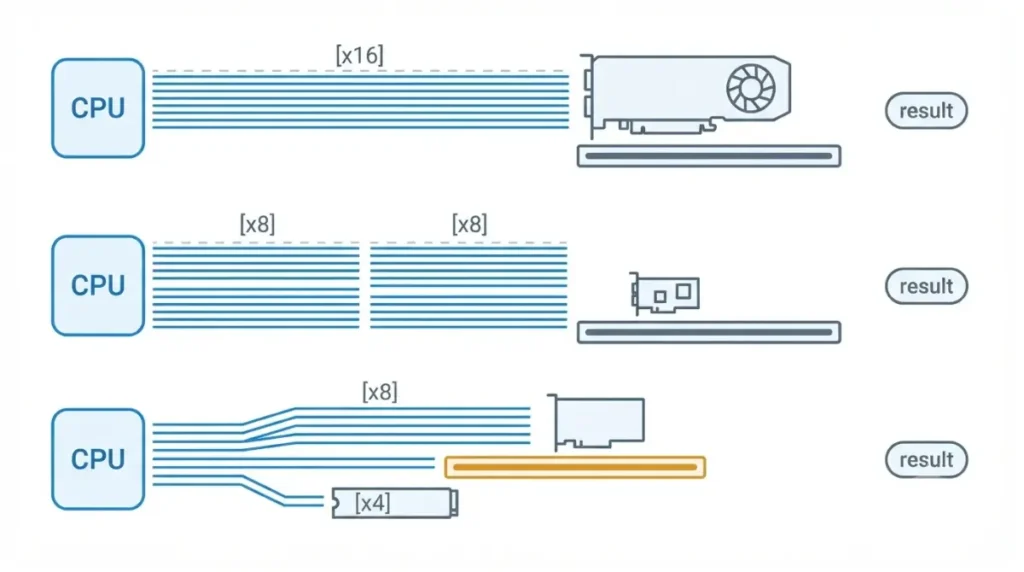
ASRock’s X870E Taichi has no chipset expansion slot to fall back on. The only chipset entry under Slots on its spec page is a vertical Key E socket for the Wi-Fi module, so any second card, from capture hardware to another GPU, goes into PCIE2, which runs in x16 or x8/x8 modes with PCIE1.
ASUS spells the split out on the ProArt X870E-Creator WiFi. Use both Gen5 slots and each runs at x8. Enable M.2_2 as well and the second slot drops to x4 while the graphics slot stays at x8. The ProArt Z890-Creator WiFi gives its pair of Gen5 slots the same x16 or x8/x8 modes.
The chipset sets whether a board can do this at all. AMD’s chipset table allows “1×16 or 2×8” graphics on X870E, X870 and B850. Intel’s Z890 page includes a 2×8 processor configuration, while the B860 page has only 1×16 plus 1×4, and every extra slot on MSI’s B860 Tomahawk comes from the chipset.
Whether a graphics card at x8 loses anything you’d notice depends on its own interface, and the measured numbers are in what an x8 link does to a graphics card.
Before you buy: on the ProArt X870E-Creator WiFi, a Ryzen 8700, 8600 or 8400 limits the top slot to x8 total and disables PCIEX16(G5)_2, and a Ryzen 8500 or 8300 limits it to x4. With those processors, plan the second card for the chipset slot.
Chipset slots: switched off, narrowed or left alone
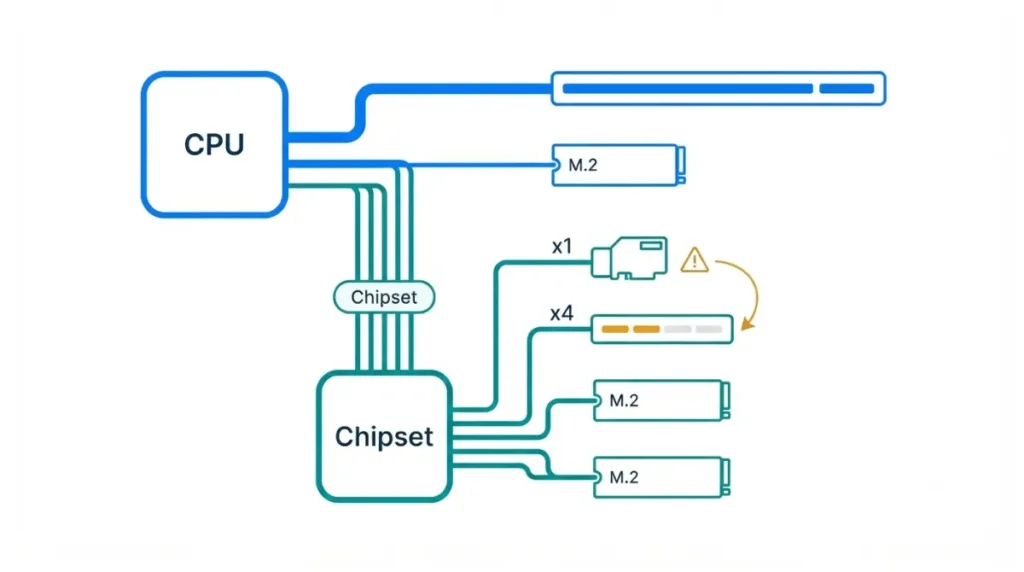
On MSI’s B860 Tomahawk, a card in the x1 slot PCI_E2 halves the x4 slot PCI_E3. MSI’s spec page says PCI_E3 runs at x2 when a device is installed in PCI_E2, and no M.2 drive is involved. To keep all four lanes for an x4 card in PCI_E3, leave PCI_E2 empty.
Two ASUS boards switch a chipset slot off instead. The TUF Gaming B850-Plus WiFi disables PCIEX16(G4) whenever M.2_3 runs, and the ProArt Z890-Creator WiFi disables its PCIe 4.0 x16-length slot when M.2_5 is operating. On both, the add-in card and the third or fifth drive compete for the same lanes, and the card loses.
The MSI X870E Tomahawk, the GIGABYTE X870E Aorus Elite WiFi7 and the MSI Z890 Tomahawk attach no footnote to any of their expansion slots.
Generation still differs between slots that look identical. GIGABYTE’s PCIEX4_2 is the same x16 length as PCIEX4_1 and also runs at x4, but it supports PCIe 3.0 where PCIEX4_1 supports PCIe 4.0. The X870E Tomahawk’s PCI_E2 is a PCIe 3.0 x1 slot. If an M.2 drive took a SATA port from you instead, why an M.2 slot disables a SATA port walks through that case.
Every chipset slot shares one link to the processor
A Z890 board’s chipset has twice as many lanes back to the CPU as a B860 board’s. Intel lists 8 DMI 4.0 lanes for the Z890 and 4 for the B860.
A lane is one send-and-receive pair, and every slot and M.2 socket on the board is built from groups of them. The processor’s own lanes feed the graphics slot and one or two M.2 sockets, and everything else reaches the processor through that one chipset link. On MSI’s Z890 Tomahawk, PCI_E2, PCI_E3, M.2_3 and M.2_4 all come from the chipset, so a video capture card in PCI_E3 recording to a drive in M.2_3 sends both streams across the same DMI link.
AMD’s AM5 chipset table doesn’t list the width of this link. It gives platform totals instead: 44 usable PCIe lanes for X870E, and 36 for X870 and B850.
Will your card run in an x4 or x1 slot?
Your card’s own spec sheet lists its interface, such as PCIe 4.0 x4, and that line decides the slot. A capture card or 10GbE card belongs in a chipset x4 slot that no M.2 socket on your board switches off, and it runs at the narrower width and the older PCIe generation of the card and the slot.
The x4 chipset slots on the ASUS and GIGABYTE boards above are full x16 length. On the ASUS spec pages each one reads “PCIe 4.0 x16 slot (supports x4 mode)”, so a long card fits physically and still links at x4. The MSI and ASUS x1 slots in the table give a card a single lane.
Physical space can take a slot away too, since a 3-slot graphics card can cover the slots directly below it, which GPU clearance around the x16 slot maps out.
Check the manual that matches your board revision
GIGABYTE publishes separate spec pages for the X870E Aorus Elite WiFi7 rev 1.0/1.1, rev 1.2 and rev 1.3. Their expansion-slot footnotes match today, but on any board sold in more than one revision, read the page for the revision you own.
- Read the footnotes under Expansion Slots on the spec page for your model and revision.
- Read the Storage footnotes, because a sharing rule for an M.2 socket names the slot it switches off.
- Open the block diagram in the manual, where the maker prints one, to see which slots hang off the chipset.
- Check the maker’s bandwidth table: ASUS points to its PCIe bifurcation table, and ASRock links a PCIe/M.2 bandwidth table from its spec pages.
Match the processor lines last. ASUS splits Ryzen 8000 into an 8700, 8600 and 8400 group and an 8500 and 8300 group on the ProArt X870E-Creator WiFi, and the top slot’s width differs between them.
Other things builders ask about PCIe lanes
Which AM5 chipset has the most PCIe lanes?
Of X870E, X870 and B850, it’s X870E. AMD lists 44 usable PCIe lanes for it against 36 for the other two, and the board maker still decides which slots get them.
Is PCIe 4.0 or 5.0 better for gaming?
That depends on which graphics card and SSD you pair with the board. Whether you need a PCIe 5.0 motherboard covers both.
Pick each card’s slot before you order the drives
Decide where each add-in card goes first, then fill the M.2 sockets that leave that slot alone. Once the slot plan holds, put the board itself through the socket, BIOS and lane checks for a new motherboard.
Found this helpful? See more of our guides on Google.
Want to see our guides first on Google?