Mini-ITX limitations on 11 current boards: slots, RAM, drives

On ASUS’s Z890-I mini-ITX board, filling the second M.2 slot drops the GPU slot to x8. Ten more boards compared on RAM, M.2 and SATA.
Table of Contents
Every mini-ITX board compared here holds two DIMMs and up to 128GB of RAM, and gives the graphics card one x16 slot. The differences are in storage: from one M.2 slot on Gigabyte’s A620I AX to four on MSI’s MPG Z890I Edge Ti WiFi, and from two SATA ports to four.
Several of those drives and ports come with a condition printed only in a footnote, such as a graphics slot that drops to x8 or SATA ports that work only with a bundled card. The 11 boards are current AM5 and LGA1851 models from ASUS, MSI, Gigabyte and ASRock, read from each maker’s product listing.
Eleven mini-ITX boards, side by side
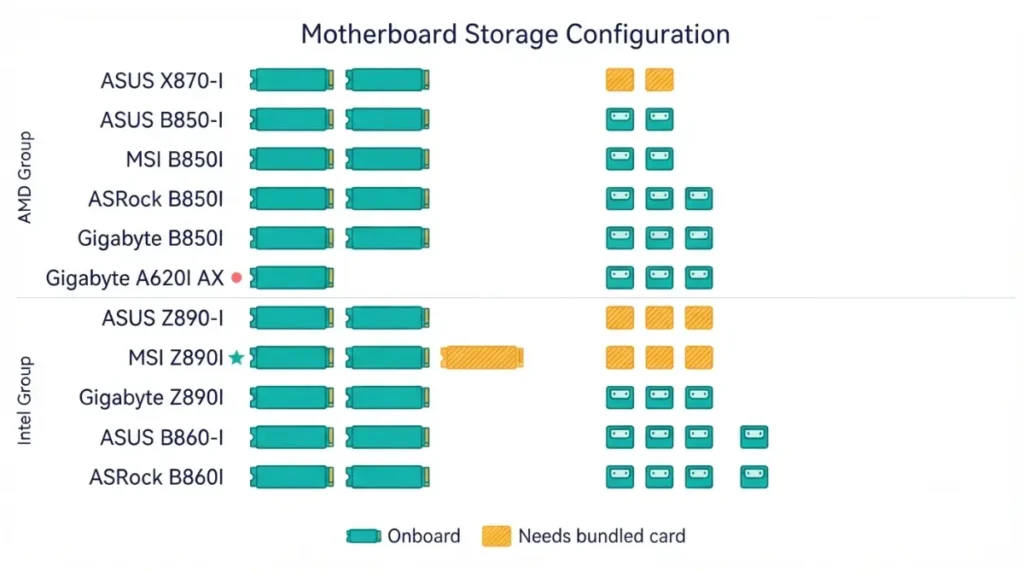
Two Intel B860 boards built for the same Core Ultra (Series 2) chips differ by a SATA port. The ASUS ROG Strix B860-I has four and the ASRock B860I Lightning WiFi has three. ASUS’s Z890-I, on the higher chipset, has two, and only with a card fitted.
The six AM5 boards, for Ryzen 9000, 8000 and 7000 chips:
| Board | Max RAM | Graphics slot | M.2 slots | SATA |
|---|---|---|---|---|
| ASUS ROG Strix X870-I Gaming WiFi | 128GB | PCIe 5.0 x16; PCIe 4.0 with Ryzen 8000 | 2: CPU PCIe 5.0 x4, chipset PCIe 4.0 x4 | 2, with ROG FPS Card |
| ASUS ROG Strix B850-I Gaming WiFi | 128GB | PCIe 5.0 x16; PCIe 4.0 with Ryzen 8000 | 2: both PCIe 5.0 x4 with Ryzen 9000/7000 | 2 |
| MSI MPG B850I Edge Ti WiFi | 128GB | PCIe 5.0 x16; PCIe 4.0 x8 or x4 with Ryzen 8000 | 2: CPU PCIe 5.0 x4, chipset PCIe 4.0 x4 | 2 |
| ASRock B850I Lightning WiFi | 128GB | PCIe 5.0 x16; Gen4 x8 or x4 with Ryzen 8000 | 2: CPU Gen5 x4, chipset Gen4 x4 | 2 |
| Gigabyte B850I Aorus Pro | Two DDR5 DIMMs, no total listed | PCIe 5.0 x16 | 2: front PCIe 5.0 x4, back PCIe 4.0 | 2 |
| Gigabyte A620I AX (rev. 2.0) | 128GB | PCIe 4.0 x16; x8 or x4 with Ryzen 8000 | 1: CPU PCIe 4.0 x4 | 2 |
Sources: ASUS X870-I, ASUS B850-I, MSI B850I, ASRock B850I, Gigabyte B850I, Gigabyte A620I AX.
The five LGA1851 boards, for Intel Core Ultra (Series 2) chips:
| Board | Max RAM | Graphics slot | M.2 slots | SATA |
|---|---|---|---|---|
| ASUS ROG Strix Z890-I Gaming WiFi | 128GB | PCIe 5.0 x16, x8 when M.2_2 is filled | 2: both CPU PCIe 5.0 x4 | 2, with ROG FPS Card |
| MSI MPG Z890I Edge Ti WiFi | 128GB | PCIe 5.0 x16 | 4: CPU PCIe 5.0 x4 and 4.0 x4, two chipset PCIe 4.0 x4 | 2, on the XPANDER card |
| Gigabyte Z890I Aorus Ultra | 128GB | PCIe 5.0 x16 | 2: CPU PCIe 5.0 x4, chipset PCIe 4.0 x4 on the back | 2 |
| ASUS ROG Strix B860-I Gaming WiFi | 128GB | PCIe 5.0 x16 | 2: CPU PCIe 5.0 x4, chipset PCIe 4.0 x4 | 4 |
| ASRock B860I Lightning WiFi | 128GB | PCIe 5.0 x16 | 2: CPU Gen5 x4, chipset Gen4 x4 | 3 |
Sources: ASUS Z890-I, MSI Z890I, Gigabyte Z890I, ASUS B860-I, ASRock B860I.
The memory column barely moves. Storage is where these boards split, and the graphics column hides the rule most likely to change a parts list.
Does the graphics card keep all 16 lanes?
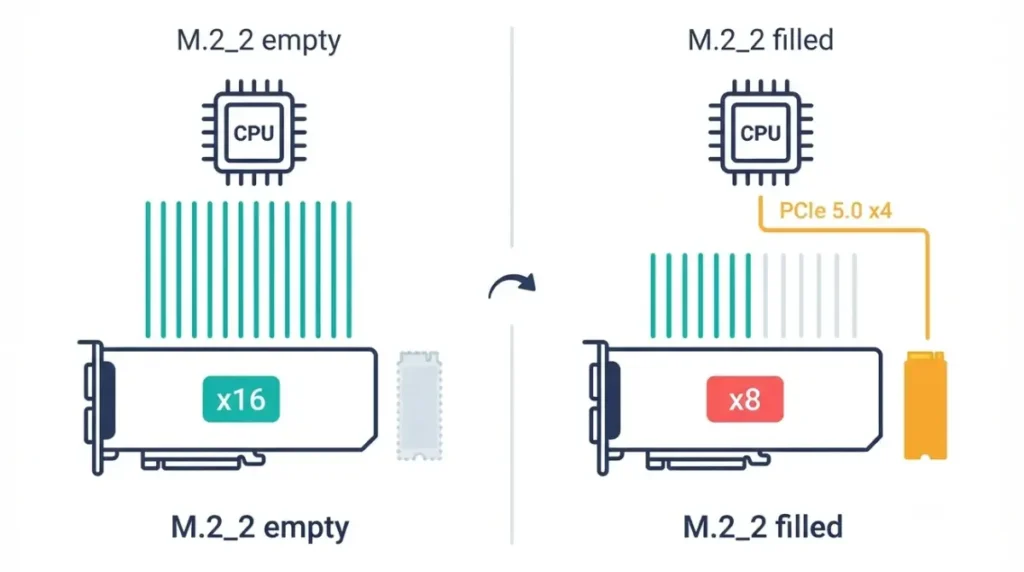
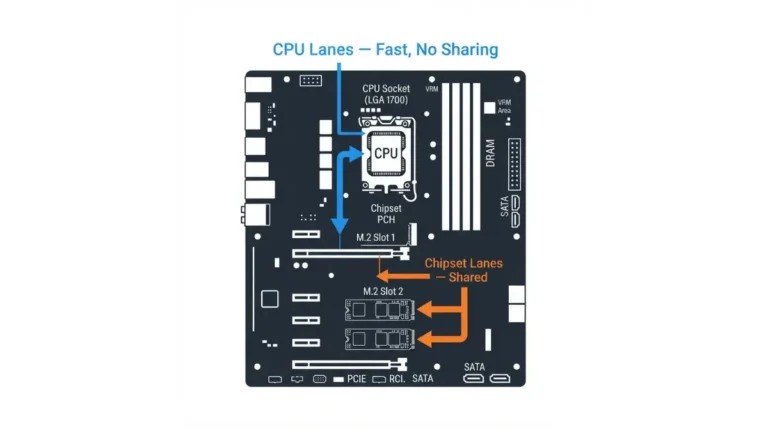
ASUS prints one line under the Z890-I’s expansion slot that changes how you plan storage: “When M.2_2 slot is occupied with SSD device, PCIEX16(G5) will run x8 only” (ROG Strix Z890-I). Both of that board’s M.2 slots are fed by the CPU at PCIe 5.0 x4, so filling the second one means the GPU slot runs at x8.
The other two Z890 boards carry no such rule. Gigabyte’s Z890I Aorus Ultra feeds its second M.2 connector from the chipset, and its x16 slot “can only support a graphics card or an NVMe SSD” (Z890I Aorus Ultra). MSI rates its slot at up to x16 and offers a manual BIOS setting that splits it into x8+x8 or x8+x4+x4 (MPG Z890I Edge Ti WiFi).
Whether a particular card loses frame rate at x8 depends on the card itself, and that takes measured results that no board listing gives.
With one slot, there is nowhere inside the case for a second card. A capture card, network card or sound card has to be an external or USB model, a point Corsair’s ITX glossary also makes.
Ryzen 8000 chips cut the slot first
On AM5, the processor sets the link before the board does. The MSI B850I’s slot runs PCIe 4.0 x8 with the Ryzen 8700, 8600 and 8400, and PCIe 4.0 x4 with the 8500 and 8300 (MPG B850I Edge Ti WiFi). ASRock and Gigabyte describe the same x8 and x4 split under AMD’s Phoenix 1 and Phoenix 2 names (B850I Lightning WiFi, A620I AX).
The CPU-fed M.2 slot drops too. With a Ryzen 8000 chip it falls from PCIe 5.0 to 4.0 on the ASUS X870-I, the MSI B850I and the ASRock B850I.
Every board stops at 128GB of RAM
At 64GB per module, two slots make 128GB, which is how Gigabyte states the limit for the Z890I Aorus Ultra and the A620I AX. Ten of the 11 listings give 128GB on two DIMMs as the total. Gigabyte’s B850I Aorus Pro page names the two DDR5 slots without a figure.
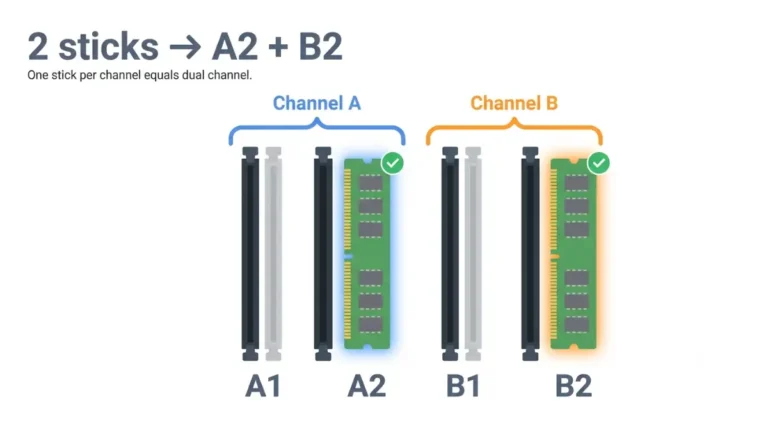
That ceiling matters more at upgrade time than at purchase. A 32GB kit already fills both slots, so moving to 64GB means replacing both sticks rather than adding a pair. The slot-order rules that come with four-slot boards don’t apply here, because two modules always run one per channel.
Home-server builders get ECC on some of these boards. The ROG Strix X870-I takes ECC as well as non-ECC unbuffered DIMMs, and so does the ASRock B850I Lightning WiFi. Speed ratings and the qualified-module list are a separate check, covered in matching a RAM kit to your motherboard.
M.2 slots: one on budget boards, four on MSI’s Z890I
On Gigabyte’s Z890I Aorus Ultra, the chipset M.2 connector sits on the back of the board, and the B850I Aorus Pro puts its PCIe 4.0 slot on the underside too. Adding a second drive later means getting at the rear of the board.
Nine of the 11 boards have two M.2 slots. The exceptions sit at both ends of the range. Gigabyte’s A620I AX has a single CPU-fed PCIe 4.0 x4 slot. MSI’s Z890I has four: PCIe 5.0 x4 and PCIe 4.0 x4 from the CPU, then two PCIe 4.0 x4 slots from the chipset, with M.2_4 running from the bundled 5-in-1 XPANDER (MPG Z890I Edge Ti WiFi).
ASUS’s B850-I wires both of its slots for PCIe 5.0 x4 with Ryzen 9000 and 7000 chips, and its listing attaches no lane cost to the graphics slot (ROG Strix B850-I).
Drive lengths each slot takes
The MSI, Gigabyte and ASRock slots in this set take 2280 drives. ASUS allows shorter ones: both B850-I slots take 2242, 2260 and 2280, and both Z890-I slots add 2230.
Full-size boards carry more, and how many M.2 drives ATX boards run at once compares nine of them. On these mini-ITX boards, MSI’s M.2_3 on the Z890I is the only slot listed with a SATA mode. Every other slot is described in PCIe modes alone, with no M.2 SATA support stated.
Ports that live on the bundled add-on card
Read the note under the SATA count before counting ports. The X870-I and Z890-I each have two SATA 6Gb/s ports, and both pairs need the ROG FPS Card installed (ROG Strix X870-I). MSI’s Z890I puts both of its SATA ports and its fourth M.2 slot on the 5-in-1 XPANDER.
The most onboard SATA in the set is on the B860 pair, with four ports on ASUS’s B860-I and three on ASRock’s B860I Lightning WiFi, all from the chipset.
Before you buy: a used board sold without its FPS Card or XPANDER loses the ports that card carries. Look for the card in the listing photos, or ask the seller before paying.
When micro-ATX is the better buy
A streaming PC with a graphics card, an internal capture card and three NVMe drives fits none of these 11 boards. The capture card has no slot, and only MSI’s Z890I takes a third NVMe drive, through its XPANDER card.
Micro-ATX suits your parts list better if it needs any of these:
- a second internal PCIe card
- more than 128GB of RAM
- more M.2 drives than the board offers without an add-on card
- more than four SATA drives
- more fan headers than the board has, since the nine listings that count them give two to four
Board size also decides which cases you can use, and board sizes and the cases that take them lists the formats each case accepts.
One storage table to check before you order
Open the maker’s specification listing for the board you plan to buy, and match the model name and revision to the box.
- In the expansion slot entry, note the PCIe version given for your CPU family.
- In the storage entry, count M.2 slots and SATA ports, and mark any that need a bundled card.
- Read every asterisk and footnote under both entries, since that is where ASUS put the Z890-I’s x8 rule.
- Count your drives and cards against what is left.
If the count comes up short, change the board before you buy the drives. Socket and BIOS support come next, and the full motherboard compatibility checklist walks through both.
Found this helpful? See more of our guides on Google.
Want to see our guides first on Google?