Check motherboard BIOS version CPU support before you install
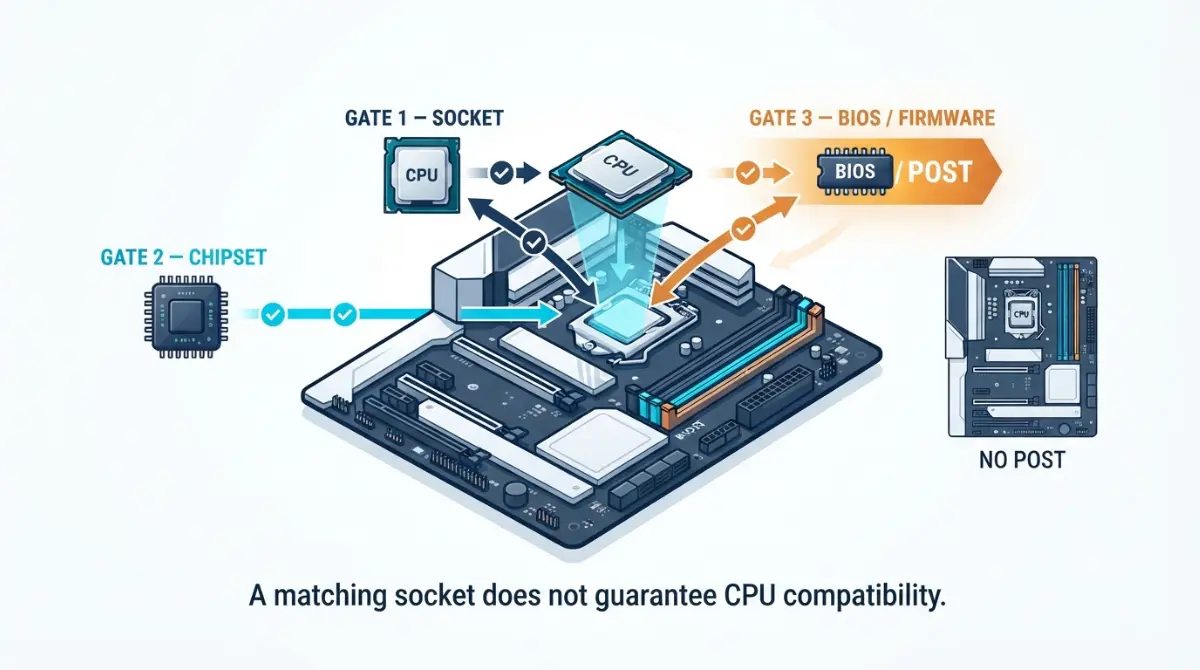
Table of Contents
The socket matches and the chipset is right, and the PC still won’t start. Motherboard firmware is a third compatibility gate, and it’s the one most buyers skip.
Three situations bring people to this page. Still choosing parts? Check the BIOS version requirement before you order — it can change which board you buy. CPU already in hand? Find your board’s published minimum before you install it. Built it already and getting no display? Start at the troubleshooting section, because not every no-boot is firmware.
One thing this article won’t do is hand you a version number. That number is published per board model, and what follows shows you exactly where yours lives.
ℹ️ Risk Note: Flashing a BIOS can permanently disable a motherboard if the process is interrupted or the wrong file is used. Use only your board manufacturer’s file for your exact model and revision, follow only their published method, and contact their support or an authorised service centre if anything is unclear.
Why the right socket still isn’t enough
A processor clears three separate gates before a board will start it: the physical CPU socket, the chipset, and the BIOS release currently installed on the board.
What the firmware actually holds for your CPU
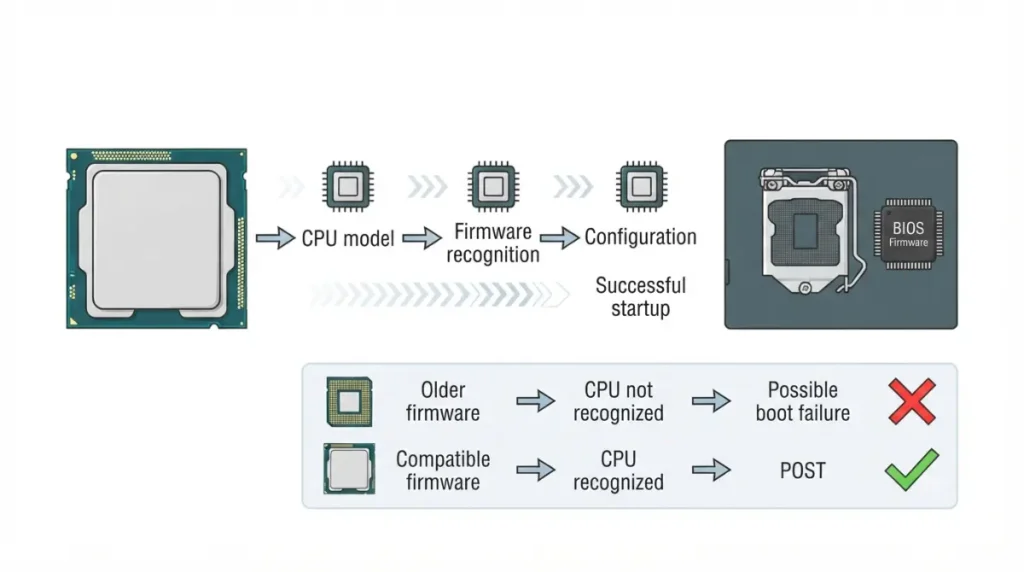
Board firmware carries the code needed to recognise and configure a specific processor. A board manufactured before your CPU existed has none of that code until a later release adds it. AMD’s own documentation states that a BIOS update may be needed when a motherboard does not already support a newer Ryzen desktop processor.
What happens when the version is too old
Where the firmware does not support the installed processor, AMD says the computer may fail to boot. Symptoms differ by board, so treat a dead first boot as a reason to check rather than proof of the cause.
🔍 Why It Works: The chipset defines what a board can do; the BIOS release defines what it currently knows about. A board can have every physical requirement for your CPU and still not recognise the silicon until the vendor ships a release that names it.
If you’re still deciding on parts, how the socket and chipset narrow your CPU choices covers the two gates that come before this one.
AMD: how AGESA versions map to Ryzen CPU series
AGESA is the AMD firmware package that a board vendor wraps inside its own BIOS release — and its version number is not the number you download.
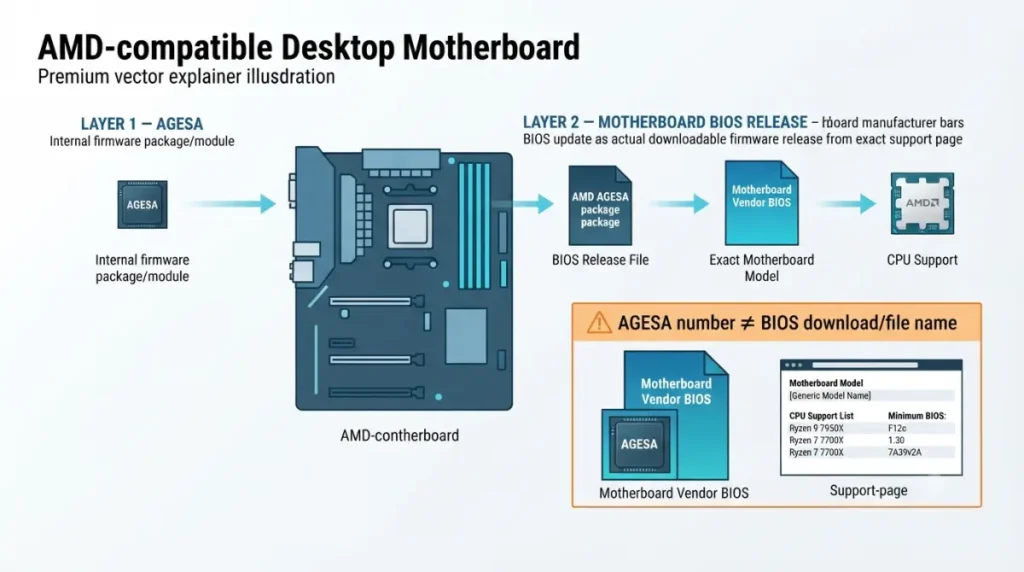
The package versus the file
| CPU series | Socket | Firmware the release must carry | Where the exact minimum is published | Key detail |
|---|---|---|---|---|
| Ryzen 9000 / X3D | AM5 | A ComboAM5 PI release naming that model | Your board model’s CPU Support List | Boards made before the model launched often ship on older firmware |
| Ryzen 7000 / 8000 | AM5 | An earlier ComboAM5 PI release naming the model | Same list | Launch-era boards usually already support these |
| Ryzen 5000 / X3D | AM4 | A ComboAM4v2 PI release naming the model | Same list | Check the notes column; some boards need an interim release first |
| Ryzen 3000 and older | AM4 | The release listed beside that model | Same list | Older boards may have limited firmware storage |
Source: AMD support documentation on BIOS updates for Ryzen desktop systems, and the manufacturer CPU support lists AMD directs users to (ASRock, ASUS, Biostar, Gigabyte, MSI).
📊 Spec Check: MSI’s June 2025 release notes for AGESA ComboAM5 PI 1.2.0.3e cover X870, B850, B840, X670, B650 and A620 boards and state the update adds support for a then-upcoming CPU. Source: MSI release announcement, June 2025.
An AGESA string appears in a changelog. The file you download carries a vendor version instead, so search your board’s support page — never the AGESA number.
Intel: microcode revisions and what your board BIOS carries
On Intel platforms the equivalent payload is a microcode revision, and it reaches users only inside a motherboard BIOS update.
Where the minimum is published
| CPU generation | Socket | Firmware the release must carry | Where the exact minimum is published | Key detail |
|---|---|---|---|---|
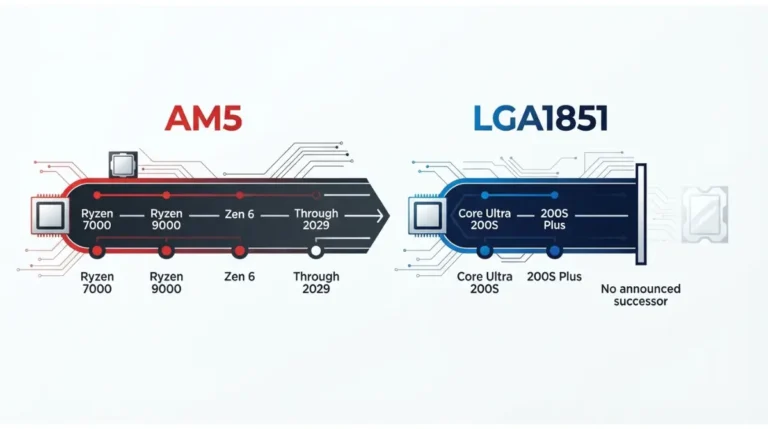
| Core Ultra 200S | LGA1851 | A release naming that model | Board model’s CPU Support List | Early boards may predate later models in the series |
| 14th / 13th Gen | LGA1700 | A release carrying microcode 0x12B or later | CPU Support List plus BIOS release notes | Stability-related, not just compatibility |
| 12th Gen | LGA1700 | The release listed beside that model | Same list | Widely supported on launch-era boards |
Source: Intel’s published root-cause update on 13th/14th Gen desktop instability, and manufacturer CPU support lists. Verified September 2026.
📊 Spec Check: Intel states that microcode 0x12B encompasses the earlier 0x125 and 0x129 updates and addresses elevated voltage requests during idle or light activity on affected 13th and 14th Gen desktop processors. Source: Intel’s published root-cause statement, September 2024. Later revisions followed.
⚠️ Watch Out: A microcode number is not a file name. Searching for “0x12B download” will not find your BIOS. Open your board model’s support page and read which release notes mention the revision.
Check 4: the notes column
Some vendors publish notes beside entries — an interim release required first, or support for certain older processors dropped in later releases. Read them before downloading anything.
✅ Do This: Open your board model’s CPU support list and confirm the minimum BIOS version before you order the processor. A board that needs an update you can’t perform is a returns problem, not a build problem.
Socket, lanes and clearance need checking too — the full motherboard compatibility check covers the rest before you order.
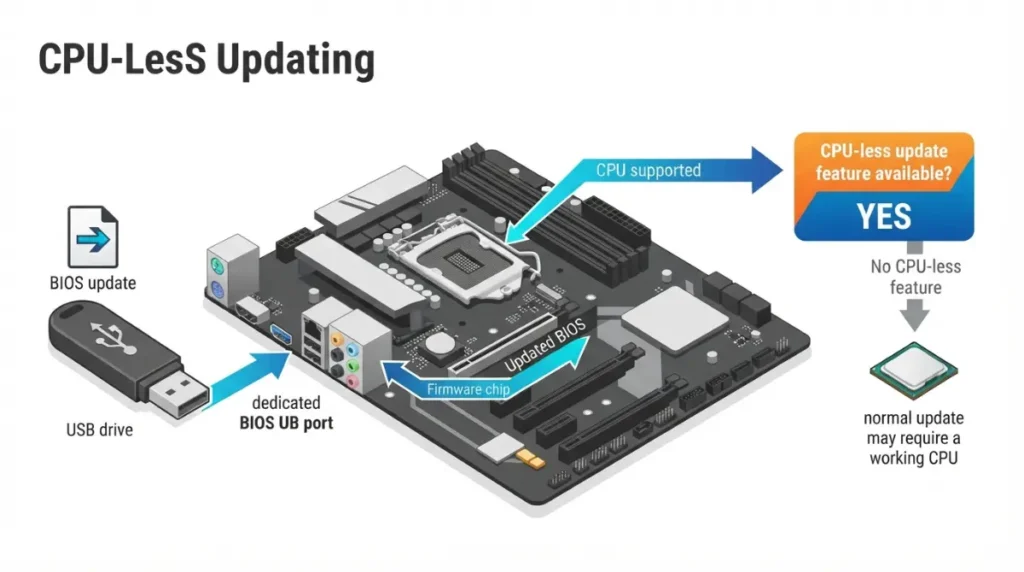
Updating when the board won’t run your CPU yet
If the board needs a newer BIOS to accept your CPU, and the normal update method needs a working CPU, the escape route is a CPU-less update feature — if your board has one.
What it’s called by brand
| Brand | CPU-less update feature | Don’t confuse it with |
|---|---|---|
| ASUS | USB BIOS Flashback | EZ Flash (in-BIOS) |
| Gigabyte | Q-Flash Plus | Q-Flash (in-BIOS) |
| MSI | Flash BIOS Button | M-Flash (in-BIOS) |
| ASRock | BIOS Flashback | Instant Flash (in-BIOS) |
Source: vendor documentation and AMD’s support guidance on USB BIOS Flashback. Naming varies by board generation — confirm against your own model’s spec sheet.
If your board doesn’t have it
AMD notes that every manufacturer has its own procedure, so follow your vendor’s page and not a generic sequence. AMD also operates a short-term processor loan boot-kit for qualified users — currently documented for Socket AM4 — after retailer and manufacturer routes have been tried.
When it still won’t POST, and what firmware can’t fix
Most first-boot failures are not firmware. Reseat the CPU power cable, reseat memory in the manual’s recommended slots, and confirm the CPU is properly seated before assuming a BIOS problem.
Symptoms that point elsewhere
Debug LEDs and POST codes mean different things on different boards. Check your manual’s legend rather than a generic chart.
What an update cannot fix
Firmware cannot change a socket, add chipset capability, or increase a board’s power delivery. If your CPU isn’t on the support list at all, no release will add it.
Will this board take the next generation?
Not answerable yet for either platform. Tom’s Hardware has reported claims about BIOS chip capacity on Intel’s next socket, sourced to a leaker and not confirmed by Intel. Wait for the CPU maker’s support page and your board’s list.
Common questions about BIOS versions and CPU support
1. Do I need a BIOS update for a new CPU?
Possibly. Motherboard BIOS version CPU support is a separate gate from socket and chipset, so check your board’s CPU support list.
2. What happens if the BIOS is too old for my CPU?
AMD states the computer may fail to boot when the installed firmware does not support the processor. Symptoms vary by board model.
3. How do I check which BIOS version my motherboard has?
Open System Information in Windows and read the BIOS Version/Date field, then compare it against your board’s published minimum.
4. What is AGESA and why does the version matter?
AGESA is the AMD firmware package inside a vendor’s BIOS release. The release must carry a version that names your processor.
5. Is the AGESA number the same as my BIOS version?
No. AGESA appears in changelogs; the file you download carries the vendor’s own version number on your board’s support page.
6. Can a newer BIOS remove support for an older CPU?
Some vendors publish notes on their CPU support lists where this applies. Read the notes column before updating.
7. Can I update the BIOS without a compatible CPU installed?
Only if your board has a CPU-less update feature. Confirm it on your model’s spec page before buying the processor.
8. Is it safe to update motherboard BIOS?
An interrupted or incorrect flash can permanently disable a board. Use only your manufacturer’s file and published method, and contact their support if unsure.
9. Should I install a beta BIOS?
Beta releases carry the vendor’s own caveats on the download page. Read those caveats before deciding.
10. Why won’t my PC POST after installing a new CPU?
Check seating, CPU power and memory first. Firmware is one cause among several, and board debug LEDs differ by model.
Your next step
Open your board model’s CPU support list, find your processor, and write down two numbers: the minimum version listed and the version your board is on now.
If the board can’t run your CPU yet, confirm whether it has a CPU-less update feature before you order anything else. We don’t test hardware here — every compatibility claim above traces to the manufacturer’s own documentation, and your board’s support list is the only place your exact number exists.