Are 4 Sticks of RAM Slower Than 2? The Clear Answer by CPU
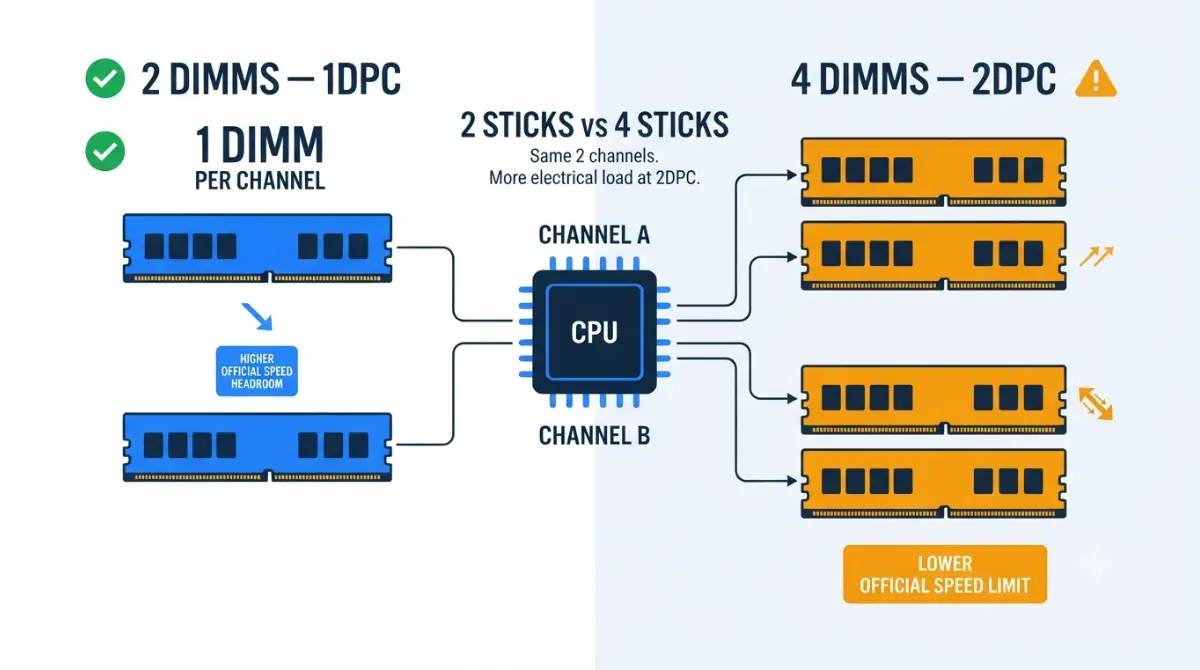
Table of Contents
Yes, 4 sticks usually run slower, and it’s by design
Four RAM sticks put two modules on each memory channel, and CPU makers officially rate that setup lower than two sticks. AMD’s Ryzen 9 9950X, for example, is rated for DDR5-5600 with two sticks but DDR5-3600 with four.
Is your RAM broken?
Probably not. If your memory speed dropped after you filled all four DIMM slots, your system is most likely following the CPU’s official rating, not reporting a fault.
Where to go next based on your situation
- Speed dropped after installing four sticks: check the official speed table, then the troubleshooting section.
- Buying RAM now: go straight to the 2×32GB vs 4×16GB matrix.
- Adding a second kit: read the upgrade checks before you order.
This guide is one part of our full motherboard compatibility checklist.
ℹ️ Risk Note: Raising memory voltages or hand-tuning timings to force four sticks past their official rating is overclocking. It can cause crashes and data corruption, and it may affect your warranty. Back up your data, follow your motherboard and memory makers’ documentation, and contact their support if anything is unclear.
Four slots, two channels: what “2 DIMMs per channel” means
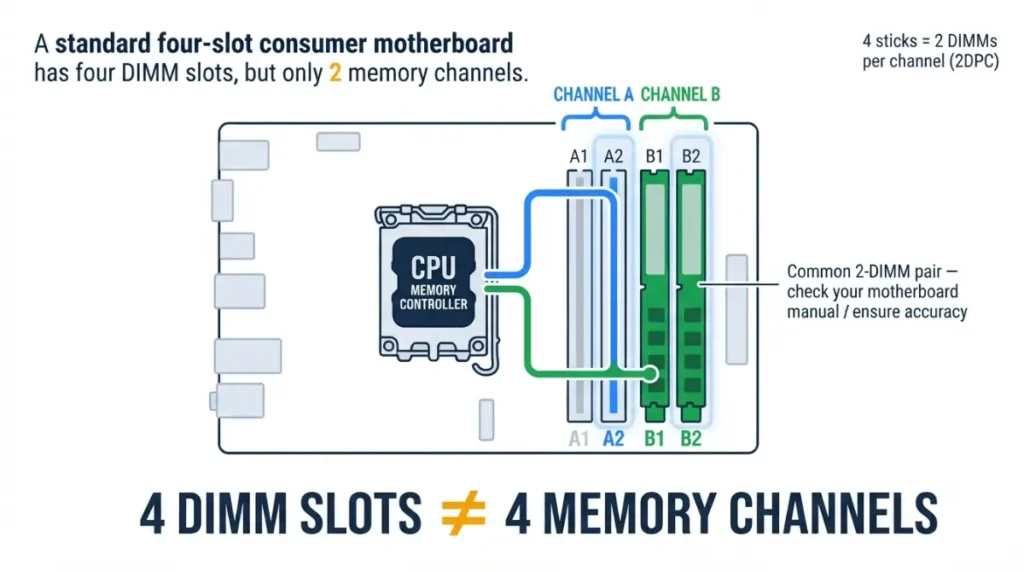
A four-slot consumer board still has only two memory channels, so extra sticks add capacity, not channels.
Slots vs channels on a consumer board
AMD’s official Ryzen 7 7700X specifications list two memory channels. On a four-slot board, two slots share one channel and the other two share the second. Four sticks never become quad-channel memory.
1DPC vs 2DPC in plain terms
1DPC (one DIMM per channel) means two sticks, one on each channel. 2DPC means four sticks, with two sharing each channel’s wiring.
🔍 Why It Works: Each channel is a single set of wires from the CPU’s memory controller. A second stick on those wires adds a second electrical load, which is harder to drive cleanly at high speed.
Official RAM speed with 2 sticks vs 4 sticks, by CPU
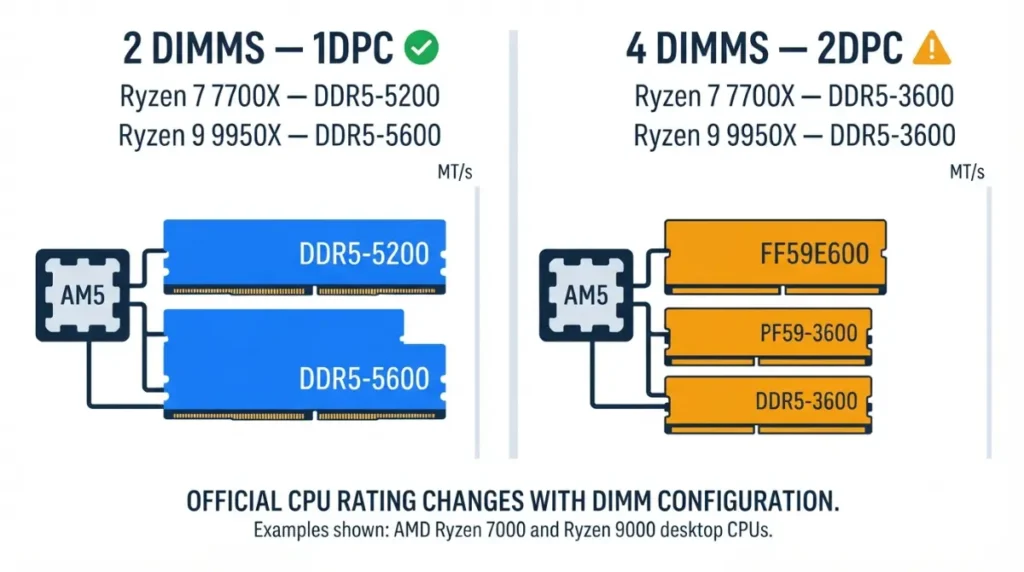
Both AMD and Intel rate memory speed by configuration, and the official number falls when you move to 2DPC.
AMD Ryzen 7000 and 9000 (AM5)
AMD lists both figures under “Max Memory Speed” on each CPU’s spec page, including AMD’s official Ryzen 9 9950X specifications.
Intel Core 14th gen and Core Ultra 200S
Intel publishes 1DPC speeds and states that extra DIMMs on a channel may lower the maximum. Its spec pages don’t list a 2DPC figure; Intel’s Core Ultra Series 2 product brief points to a separate design document for those details.
| CPU family (example) | 2 sticks (official) | 4 sticks | Key Detail |
|---|---|---|---|
| Ryzen 7000 (Ryzen 7 7700X) | DDR5-5200 | DDR5-3600 (official) | Same for 1R and 2R sticks |
| Ryzen 9000 (Ryzen 9 9950X) | DDR5-5600 | DDR5-3600 (official) | Same for 1R and 2R sticks |
| Core 14th gen (i7, i9, select i5) | DDR5-5600 (1R) / DDR5-5200 (2R) | Not published; “may impact” speed | Intel rates 1DPC only |
| Core Ultra 200S | Up to DDR5-6400 (CUDIMM) | At best 4800 MT/s, per Puget Systems | Needs CUDIMMs for 6400 |
| Core Ultra 200S Plus | Up to DDR5-7200 (CUDIMM) | At best 4800 MT/s, per Puget Systems | Needs CUDIMMs for 7200 |
Source: AMD product specification pages; Intel 14th-gen quick reference guide, Core Ultra Series 2 product brief, and Intel newsroom (200S Plus); Puget Systems’ Core Ultra 200S Plus memory analysis. Last reviewed September 2026.
Does single or dual rank change it?
Not on AMD’s official ratings. Single-rank (1R) and dual-rank (2R) sticks get the same figure at each stick count.
Why the second stick on each channel slows everything down
The slowdown comes from the wiring between the CPU and the slots, not from the sticks themselves.
Daisy-chain wiring and signal reflections
Many boards use a daisy-chain layout: each channel’s traces run from the CPU to one slot, then continue to the next. With two sticks, each channel’s signal ends at one module. With four, it meets two modules on the same line, and reflections between them distort the signal.
🔍 Why It Works: A distorted signal is harder to read at high speed, so the memory controller must run a lower transfer rate to read it reliably. That’s why AMD’s official rating drops to DDR5-3600 at 2DPC.
Why EXPO/XMP profiles often fail with four sticks
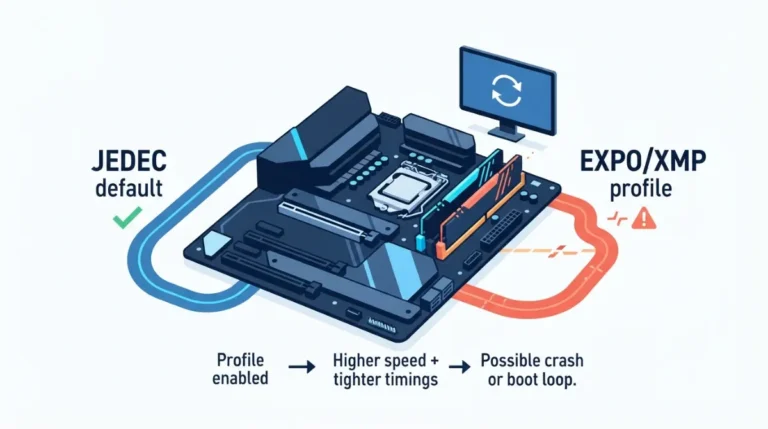
An EXPO or XMP profile is rated for the kit as sold, and enthusiast kits are usually two sticks. Installing two such kits asks the controller to run a two-stick profile at 2DPC, far above AMD’s official DDR5-3600.
2×32GB or 4×16GB? Pick by the capacity you need
For the same capacity, two larger sticks keep the higher 1DPC rating.
Capacity-to-configuration matrix
| Capacity | Two-stick build | Four-stick build | Key Detail |
|---|---|---|---|
| 32GB | 2×16GB | 4×8GB | Two sticks keeps the 1DPC rating |
| 48GB | 2×24GB | — | Uses non-binary 24GB modules |
| 64GB | 2×32GB | 4×16GB | Four sticks drops to the 2DPC rating |
| 96GB | 2×48GB | 4×24GB | Largest two-stick option on Corsair’s list |
| 128–192GB | 2×64GB, only if your QVL lists it | 4×32GB or 4×48GB | Runs at the 2DPC rating |
Source: AMD and Intel spec pages (DPC ratings); Corsair’s memory guide (non-binary 24GB/48GB modules). Last reviewed September 2026.
When four sticks still make sense
If your work needs more memory than two sticks can hold on your board, capacity matters more than rated speed. The rating comes from the CPU, so it applies on any board; our AM5 chipset comparison covers what does change between boards.
Adding a second RAM kit: what to expect and check first
Adding a second copy of your current kit moves you from 1DPC to 2DPC, so expect the lower rating.
Why two identical kits aren’t a matched four-stick kit
Your kit’s rated speed was validated as a two-stick set. Corsair advises replacing it with a new validated kit rather than mixing kits, because mixing can cause system instability.
Safe checks before you install
✅ Do This: Check your board’s QVL for four-DIMM validation of your exact kit, and read its BIOS release notes for memory updates. If you need to update the BIOS before adding memory, use only your board maker’s file and method.
⚠️ Watch Out: Raising voltages or hand-tuning timings to hit a two-stick profile speed is overclocking and can corrupt data. If four sticks won’t run at their default speed, contact the memory maker’s support with your board model and BIOS version.
RAM slower, unstable, or slow to boot after adding sticks?
Three situations cover most questions after a four-stick install. Start with the first that matches.
Speed shows 3600 or 4800 after install
That’s likely the expected 2DPC rating, not a fault. Confirm it against your CPU’s Max Memory Speed field.
Long first boot or EXPO/XMP crashes
The first boot after a memory change can take longer while the board trains the new modules. If the system crashes with EXPO or XMP on, disable the profile in BIOS so the kit returns to its default speed.
Two sticks in the wrong slots
With two sticks, use the slot pair named in your manual’s memory population table, one stick per channel. Never put both sticks on the same channel.
Frequently asked questions
1. Does 4 sticks of RAM slow down your PC?
Four sticks of RAM usually run slower officially. AMD rates Ryzen 9000 at DDR5-3600 with four sticks versus DDR5-5600 with two.
2. Is 2 or 4 sticks of RAM better for gaming?
For the same capacity, 2 sticks of RAM keep the higher official speed rating. Four make sense only when you need more capacity.
3. Why won’t EXPO or XMP work with 4 sticks?
EXPO and XMP profiles are rated for the kit as sold, usually two sticks. Four sticks push the profile above the CPU’s 2DPC rating.
4. Which slots for 2 sticks of RAM?
Use the two slots your motherboard manual’s population table names for 2 sticks of RAM: one per channel, never both on one channel.
5. Is 2x32GB better than 4x16GB?
2x32GB keeps the higher official 1DPC rating. 4x16GB drops to the 2DPC rating, such as DDR5-3600 on Ryzen 7000 and 9000.
6. Can I mix two RAM kits?
Mixing two RAM kits can cause instability, so Corsair recommends replacing them with a single validated kit instead. If a mixed setup won’t run at default speed, contact the memory maker’s support.
7. Does single or dual rank matter with 4 sticks?
On AMD’s official ratings, single-rank and dual-rank sticks get the same speed: DDR5-3600 with 4 sticks on Ryzen 7000 and 9000.
8. Do CUDIMMs fix the 4-stick speed drop?
No. Intel’s DDR5-6400 and 7200 CUDIMM ratings apply at 1DPC; Puget Systems reports more than two DIMMs drop to 4800 MT/s at best.
9. Do 4 sticks of RAM give quad-channel memory?
No. Four sticks of RAM on a consumer board still use two memory channels, so the extra sticks add capacity only.
10. Is a 4-stick RAM speed drop a defect?
Usually not. A 4-stick RAM speed drop matches AMD’s official 2DPC ratings; check your CPU’s Max Memory Speed field to confirm.
The bottom line on four sticks
Four sticks run slower because AMD and Intel both rate 2DPC below 1DPC. It’s documented behavior, not a defect. Check your CPU’s Max Memory Speed, and buy two larger sticks when speed matters or four when capacity matters. If you’re adding taller sticks, also confirm your cooler’s clearance over the RAM slots.