AM5 chipset comparison from X870E down to B840 and A620

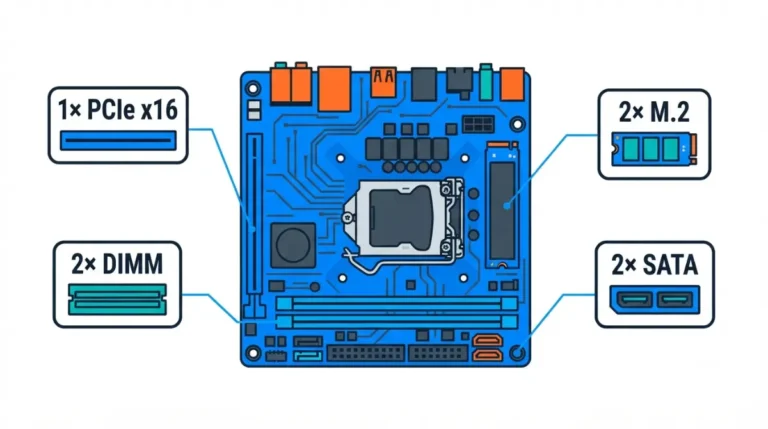
AM5 chipsets side by side: B840 runs on Promontory 19, the B550 chip, and the ROG Strix X870E-E halves its x16 slot when M.2_2 is filled.
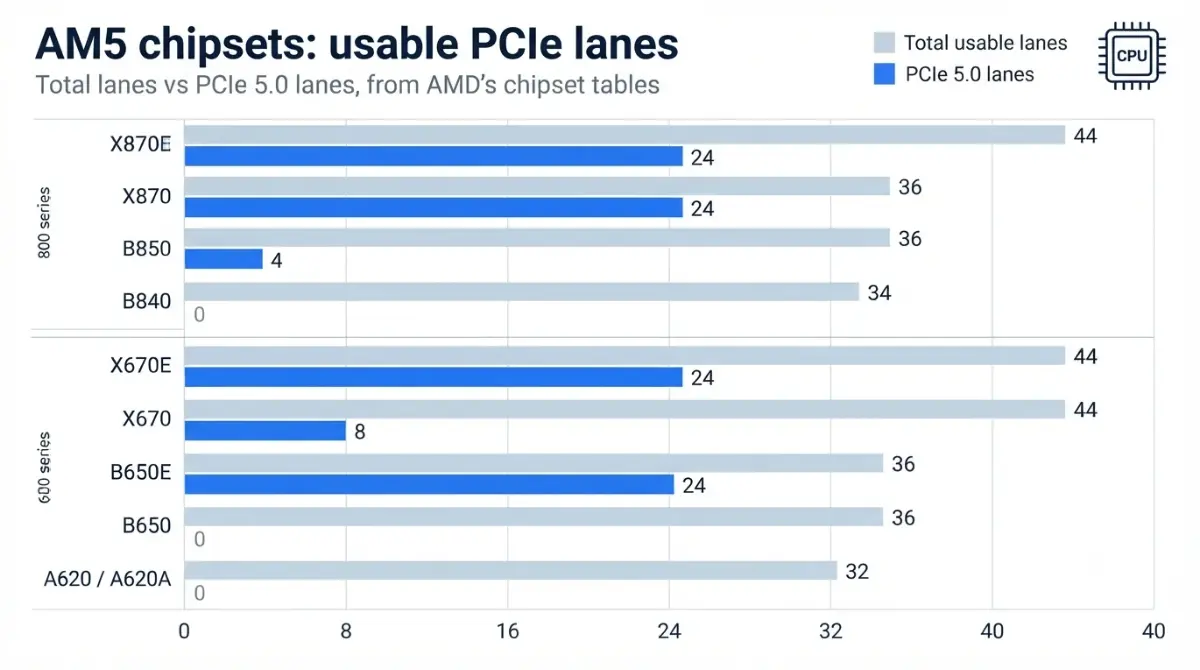
Table of Contents
Every AM5 chipset from X870E down to A620 runs the same Ryzen 7000, 8000 and 9000 processors, so the choice is about what the board around the CPU is allowed to offer. In AMD’s own tables, X870E and X870 both permit up to 24 PCIe 5.0 lanes and must include USB4, B850 permits 4, and B840 permits none.
Those three Ryzen families are supported on every board with a 600- or 800-series chipset (AMD Socket AM5 platform page). The tables below put the ten chipsets side by side. The sections after them sort out which limits come from the processor and which from the chipset, and show where a single board’s footnotes overrule its chipset name.
Ten AM5 chipsets side by side
Read “optional” literally in both tables. It means AMD allows the feature on that chipset and each board maker decides whether to build it in, while “required” means every board sold under that chipset name has it.
| Chipset | Graphics slot (CPU lanes) | Primary M.2 (CPU lanes) | Usable lanes, total / PCIe 5.0 | Chipset silicon |
|---|---|---|---|---|
| X870E | 1×16 or 2×8, PCIe 5.0 | PCIe 5.0 x4 | 44 / 24 | Two Promontory 21 |
| X870 | 1×16 or 2×8, PCIe 5.0 | PCIe 5.0 x4 | 36 / 24 | One Promontory 21 |
| B850 | 1×16 or 2×8, PCIe 4.0 | PCIe 5.0 x4 | 36 / 4 | One Promontory 21 |
| B840 | 1×16, PCIe 4.0 | PCIe 4.0 x4 | 34 / 0 | One Promontory 19 |
| X670E | 1×16 or 2×8, PCIe 5.0 | PCIe 5.0 x4 | 44 / 24 | Two Promontory 21 |
| X670 | 1×16 or 2×8, PCIe 4.0 | PCIe 5.0 x4 | 44 / 8 | Two Promontory 21 |
| B650E | 1×16 or 2×8, PCIe 5.0 | PCIe 5.0 x4 | 36 / 24 | One Promontory 21 |
| B650 | 1×16 or 2×8, PCIe 4.0 | PCIe 4.0 x4 (PCIe 5.0 optional) | 36 / 0 | One Promontory 21 |
| A620 / A620A | 1×16, PCIe 4.0 | PCIe 4.0 x4 | 32 / 0 | Cut-down Promontory 21 (first A620 boards); Promontory 19 (A620A) |
Sources: AMD Socket AM5 Quick Reference Guide for the X870E, X870 and 600-series rows; AMD’s B850 and B840 specifications as printed by Tom’s Hardware; silicon from TechSpot, HWCooling on the 800 series, HWCooling on A620 and Wccftech on A620A.
| Chipset | CPU overclocking | USB 20Gbps / 10Gbps, max | SATA ports, max | USB4 |
|---|---|---|---|---|
| X870E | Yes | 2 / 12 | 8 | Required |
| X870 | Yes | 1 / 6 | 4 | Required |
| B850 | Yes | 1 / 6 | 4 | Optional |
| B840 | No | 0 / 2 | 4 | Optional |
| X670E | Yes | 2 / 12 | 8 | Optional |
| X670 | Yes | 2 / 12 | 8 | Optional |
| B650E | Yes | 1 / 6 | 4 | Optional |
| B650 | Yes | 1 / 6 | 4 | Optional |
| A620 / A620A | No | 0 / 2 | 4 | Not listed |
Sources: AMD Socket AM5 Quick Reference Guide; B850 and B840 rows from AMD’s table as printed by Tom’s Hardware. AMD’s SATA column counts “SATA or PCIe 3.0” lanes, so a board maker can spend some of them on other devices.
The jump from 36 to 44 usable lanes on X870E, X670E and X670 is the second Promontory 21 die, which also brings the extra SATA ports and USB (HWCooling). Each total is a platform figure with the CPU’s 24 usable lanes inside it. A620’s 32, for instance, is those 24 plus the eight PCIe 3.0 lanes the A620 chipset provides.
X870E, X870 and B850 differ in lanes and ports
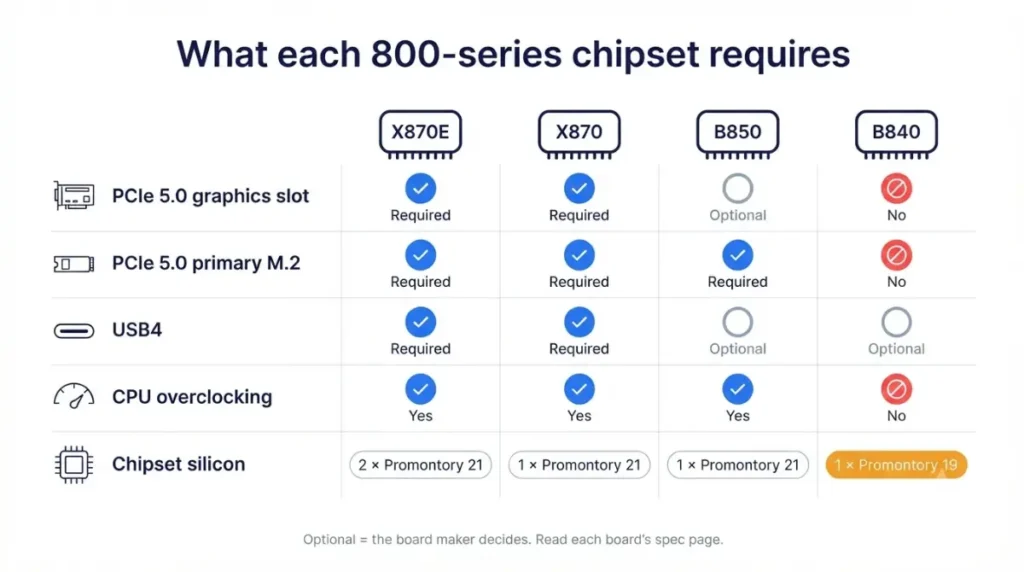
Paying for X870E over X870 buys no extra PCIe 5.0, because both carry AMD’s ceiling of 24 PCIe 5.0 lanes. What X870E adds is the second chipset die. That lifts the platform from 36 to 44 usable lanes, from 4 to 8 SATA ports, and from six to twelve 10Gbps USB ports.
Between X870 and B850, the line is USB4 and the x16 slot. X870 boards must have USB4 and run the main x16 slot at PCIe 5.0. B850 boards must give PCIe 5.0 only to the primary M.2 slot; PCIe 5.0 graphics and USB4 are each the board maker’s call (Wccftech). TechPowerUp’s Ryzen 9000 launch coverage points out that a vendor could take an X870 design, remove the USB4 interface and sell the board as B850.
The older X670E sits closer to X870E than the names suggest. AMD’s guide gives both 44 total lanes, 24 PCIe 5.0 lanes and the same SATA and USB maximums, and USB4 is required only on X870E.
If your shortlist is down to two mainstream boards, the B650 vs B850 differences go slot by slot. What the E suffix guarantees covers X670E, B650E and X870E.
Is B840 a cheaper B850?
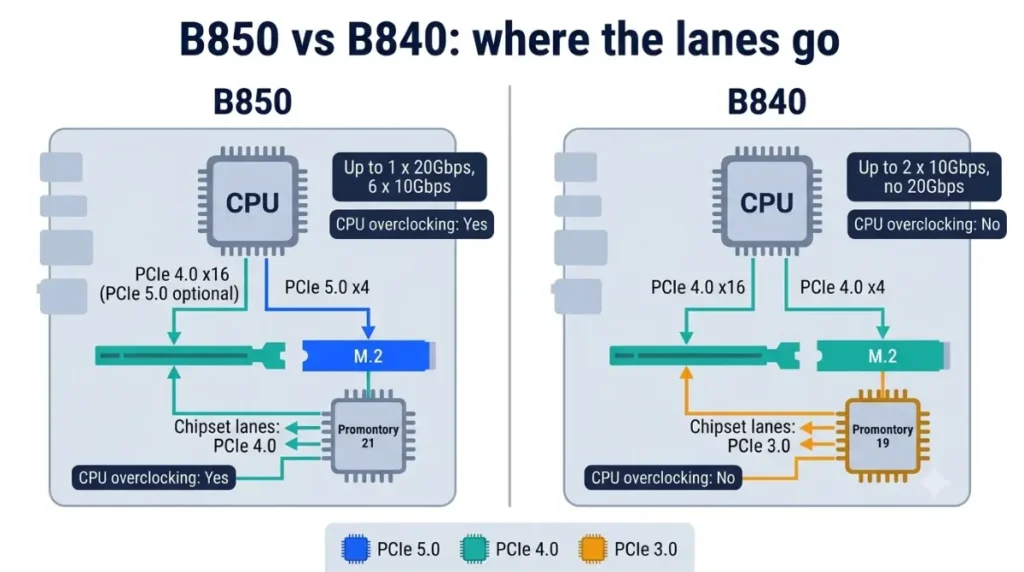
No. B840 boards use Promontory 19, the chip AMD shipped on B550 boards for AM4 (TechSpot). B850 uses the Promontory 21 found on X870 and the 600-series boards (PCGH).
That changes three things. Lanes from the B840 chipset run at PCIe 3.0, with PCIe 4.0 only on the CPU-connected slots. CPU overclocking is switched off, although DDR5 memory overclocking and EXPO profiles still work. And the chipset tops out at two 10Gbps USB ports, with no 20Gbps port.
Early AMD material described B840 graphics as PCIe 3.0 (Wccftech), and that figure still circulates. Shipping boards run the x16 slot at PCIe 4.0 because those lanes come from the processor. On the MSI PRO B840M-B, it runs at PCIe 4.0 x16 with Ryzen 9000 and 7000, x8 with the Ryzen 8700, 8600 and 8400, and x4 with the 8500 and 8300. The board’s second slot is PCIe 3.0 x1 from the chipset, and its rear panel carries four 5Gbps Type-A ports and two USB 2.0 ports, with no 10Gbps ports.
| Chipset | Chip | Chipset lane speed | Link to the CPU |
|---|---|---|---|
| B840 | Promontory 19 | PCIe 3.0 | Not stated in AMD’s table |
| A620 | Cut-down Promontory 21 | PCIe 3.0 | PCIe 4.0 x4 |
| A620A | Promontory 19 | PCIe 3.0 | PCIe 3.0 x4 |
Sources: PCGH for B840; HWCooling for A620; Wccftech for A620A.
A620 and A620A boards look alike in a listing, so read the chipset field on the datasheet. On the MSI PRO A620AM-G EVO WIFI, for example, it says “AMD A620A Chipset”.
The CPU supplies every PCIe 5.0 lane
Start with the processor. A Ryzen 7 9700X has 28 PCIe 5.0 lanes, 24 of them usable (AMD Ryzen 7 9700X specifications). The other four connect the CPU to the chipset. Sixteen of the 24 go to the graphics slot, or to two slots at x8 each, and four go to the primary M.2 slot (TechSpot).
That leaves four PCIe 5.0 lanes, and board makers spend them on USB4, a second M.2 slot, or both by sharing. Three boards show the range:
- MSI MAG X870E Tomahawk Max WiFi. The rear USB 40Gbps ports and the M2_2 slot share PCIe 5.0 x4, and both run at PCIe 5.0 x2 once a drive is installed in M2_2 (MSI specifications).
- ASUS ROG Strix X870E-E Gaming WiFi. M.2_2 and M.2_3 share bandwidth with the main slot, and it runs at x8 when either one is in use (ASUS tech specs).
- MSI MAG X870 Tomahawk WiFi. The main x16 slot shares lanes with nothing (MSI’s lane-sharing table).
An x8 link at PCIe 5.0 matches an x16 link at PCIe 4.0 in raw bandwidth. PCIe 5.0 signals at 32 GT/s per lane against 16 GT/s for PCIe 4.0 (PCI-SIG figures via HotHardware), and 8 × 32 and 16 × 16 both come to 256 GT/s.
Ryzen 8000 processors shift things again. On the Strix X870E-E, M.2_2 and M.2_3 are disabled entirely with a Ryzen 8000 chip installed.
Before you buy: Read the footnotes under the expansion-slot and storage entries for the board. ASUS and MSI print each sharing rule there, and the rule belongs to the board model, whatever its chipset.
The x8 question on more boards is answered in why a filled M.2 slot can halve the GPU slot.
What the chipset leaves alone
A first-wave B650 board and a new X870E board accept the same processor list. What differs is whether the board’s shipped firmware already recognizes your chip, which the BIOS version a CPU needs explains.
Memory overclocking, EXPO included, is enabled on every chipset in AMD’s tables, B840 and A620 among them. The speed you reach is set by the board and the processor. With Ryzen 9000 and one single-rank module per channel, the PRO B840M-B is rated to DDR5 8000+ MT/s and the MAG X870E Tomahawk Max WiFi to 8400+ MT/s.
The socket has a published runway as well, with AMD support for AM5 through 2029 (TechPowerUp). How long AM5 support lasts covers what that commitment includes.
Which AM5 chipset fits your build?
Start from the hardware you plan to connect.
- One graphics card, one or two NVMe drives and no USB4 devices: B850 gives the primary M.2 slot PCIe 5.0 and keeps CPU overclocking.
- A USB4 dock, drive or USB-C display, or a PCIe 5.0 x16 slot you want guaranteed: X870 is the lowest chipset that requires both.
- More than four SATA drives or a long run of USB devices: X870E, or X670E if USB4 is not on your list, since both carry the two-die maximums.
- An office or integrated-graphics PC with no overclocking planned: B840 or A620, after checking whether an A620 board is an A620A.
- B650 or B650E stock at a lower price: the same processor list, once the board’s BIOS supports your CPU.
CPU overclocking is the one hard cut in that list. AMD’s tables switch it off on B840 and A620 and leave it on for every chipset above them, B650 included.
Read the M.2 footnotes before you order
Open three things on the board maker’s site for the model you’ve picked, in this order:
- The CPU support list, to find your processor and the BIOS version listed beside it.
- The expansion-slot and storage footnotes, to see which M.2 slots share lanes with the x16 slot or with USB4.
- The rear-panel diagram, to count USB 40Gbps ports if you need USB4, since below X870 they are the board maker’s choice.
How those checks fit with socket and lane limits for the rest of the build is laid out in motherboard compatibility from socket to lanes.
Two more AM5 chipset questions
Is AMD still making B650?
AMD told Tom’s Hardware it was moving board partners from B650 to B850 and that remaining B650 stock would sell through at retail. Boards already built keep the same processor support.
Reports of an X970 chipset
AMD has not announced a 900-series AM5 chipset. BIOSTAR’s “next-generation AMD” teaser before Computex set off X970 talk, and the company later said it meant new 800-series boards (Igor’s Lab).
Found this helpful? See more of our guides on Google.
Want to see our guides first on Google?