Best AMD GPU for SteamOS Starts With the Right Radeon Tier
Table of Contents
Quick answer: which AMD GPU for SteamOS
Valve’s desktop SteamOS supports only AMD GPUs for now, so the choice is which Radeon fits your screen and budget. Start where your situation fits:
- Building from scratch: compare the tiers in section 3.
- Already own a Radeon: check the version rule in section 2.
- Buying for a 4K TV: read section 6 before you pay.
Why only AMD GPUs?
Valve’s Steam Machine FAQ says only AMD GPUs are supported, as GamingOnLinux reported. Born City reports Nvidia drivers are expected late 2026 at the earliest.
Where Valve’s Steam Machine sits
GamersNexus places its GPU closest to an RX 6600, Arc B570 and RTX 3060, and PC Games Hardware calls it a cut-down RX 7600. Every tier below is judged against that; our Steam Machine specs guide has the full list.
ℹ️ Risk Note: The desktop SteamOS install erases the drive it goes on. Back up your data, use only Valve’s official image and instructions, and contact Valve support if anything is unclear. This is buying guidance, not an install guide.
What SteamOS supports on a DIY PC, and what it doesn’t
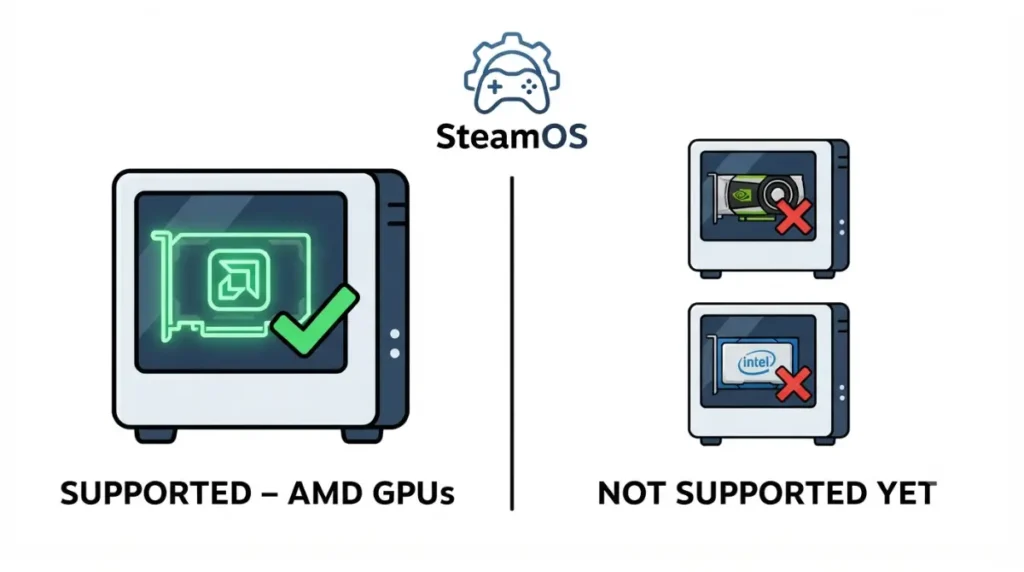
Valve says only AMD GPUs are supported on desktop SteamOS right now.
| GPU family | Desktop SteamOS status | Key Detail |
|---|---|---|
| Radeon RX 7000 (RDNA 3) | Supported | Same generation as the Steam Machine GPU |
| Radeon RX 9000 (RDNA 4) | Supported | Needs SteamOS 3.8.0 or later |
| Nvidia and Intel | Not supported for now | Valve says wider support is planned |
Source: Valve’s Steam Machine FAQ as reported by GamingOnLinux (June 2026); PC Games Hardware (24 June 2026).
Which Radeon generations work
RX 9000 series cards need SteamOS 3.8.0 or later, because 3.7.x images use Linux kernel 6.11, which cannot drive them, PC Games Hardware reported. Valve’s support-page image stayed 3.7.7 until June 24, 2026.
🧩 Compatibility Check: Find your card’s generation on its AMD spec page, then confirm Valve’s download is 3.8.0 or later. An RX 9000 card with an older image won’t install.
What the desktop install changes
Born City reports the target drive is wiped and dual-booting with Windows isn’t possible yet. Desktop SteamOS also lacks HDMI-CEC.
✅ Do This: Back up your files first, use only Valve’s official image, and contact Valve support if the installer fails.
AMD GPU tiers for SteamOS, compared with Valve’s box
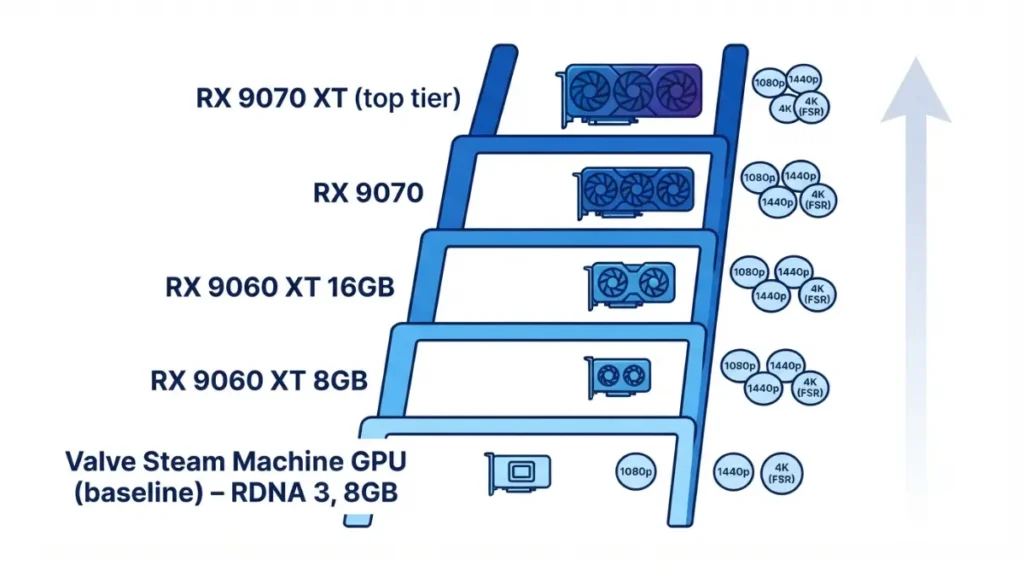
Pick the tier by target resolution, VRAM and TV output; Valve’s Steam Machine GPU is the zero line, and no tier is a single winner.
| Tier | Architecture | VRAM | Launch price | Board power |
|---|---|---|---|---|
| Valve Steam Machine (baseline) | RDNA 3, 28 CUs | 8GB GDDR6 | $1,049 (whole system) | 110W GPU limit |
| RX 9060 XT 8GB | RDNA 4 | 8GB GDDR6 | $299 | 150W |
| RX 9060 XT 16GB | RDNA 4 | 16GB GDDR6 | $349 | 160W |
| RX 9070 | RDNA 4 | 16GB GDDR6 | $549 | 220W |
| RX 9070 XT | RDNA 4 | 16GB GDDR6 | $599 | 304W |
Source: Valve specifications via PCGamesN; TechSpot spec tables. Prices are launch MSRPs (Steam Machine June 2026, RX 9060 XT June 2025, RX 9070 series March 2025), not street prices, and none were verified for October 2026. Confirm board power on your exact card’s page.
| Tier | Linux reference (Phoronix) | Windows reference (TechSpot) | Best For |
|---|---|---|---|
| RX 9060 XT 16GB | 1.27x RX 7600 XT; about 88% of RTX 5060 Ti | About 43% over RX 7600 XT at 1440p | 1080p to 1440p |
| RX 9070 XT | Similar to RX 7900 XT | 2% over RX 7900 XT at 1440p, 9% at 4K | 1440p, upscaled 4K |
Source: Phoronix (June and March 2025, Linux 6.15 and earlier); TechSpot (Windows 11 24H2, Ryzen 7 9800X3D). Neither tested the 8GB card; both are launch-era reviews.
Entry: RX 9060 XT 8GB and 16GB
Both reviews place the 16GB card well ahead of the RX 7600 XT. Phoronix tested on Linux and TechSpot on Windows, so gap sizes differ, and the 8GB card is unmeasured by either.
Upper tiers: RX 9070 and RX 9070 XT
Both reviews put the RX 9070 XT near the RX 7900 XT. TechSpot advised skipping the RX 9070 if the XT sells at MSRP.
Is DIY actually cheaper than Valve’s box?
In June 2026, GamersNexus priced DIY equivalents at $979 against $1,050 (512GB) and $1,139 against $1,350 (2TB), using paper specs.
VRAM, FSR 4 and ray tracing on Radeon under SteamOS
PC Games Hardware found 8GB becomes a clear limit in newer games at higher settings on Valve’s machine. Digital Foundry raised similar concerns but said 8GB suits much of the current Steam library.
| Option | VRAM | Key Detail |
|---|---|---|
| Steam Machine GPU | 8GB | Limit appears in newer games at higher settings |
| RX 9060 XT | 8GB or 16GB | Sold in both versions at launch |
Source: PC Games Hardware (June 2026); Digital Foundry via PureXbox; AMD launch pricing as reported by Phoronix and TechSpot.
8GB or 16GB VRAM?
The RX 9060 XT launched in both sizes. Our Steam Machine 8GB VRAM guide covers the baseline.
FSR 4 on RDNA 3 vs RDNA 4
FSR 4 is built for RDNA 4 cards. Born City reports a June 22, 2026 Proton Experimental build added an FSR 4.1 path for RDNA 3 and 3.5.
Ray tracing: what to expect from Radeon on Linux
Ray tracing on Radeon runs through Mesa’s RADV driver, so results can shift between SteamOS updates. We found no second independent comparison, so we claim no brand ranking.
Power draw, case size and PSU for a living room build
A small living room case limits card length, slot width and PSU connectors.
Board power and connectors
📊 Spec Check: TechSpot lists total board power of 220 W (RX 9070) and 304 W (RX 9070 XT). Phoronix recorded about 140 W average and 182 W peak for the RX 9060 XT in its Linux tests.
Will it fit? Card length and slot width
Case makers publish a maximum GPU length and slot count; card makers publish each model’s length and thickness. Compare both.
PSU headroom
Use the minimum PSU wattage the card maker lists for your exact model, not a sum of part wattages.
| Check | Where to read it | Why it matters |
|---|---|---|
| Card length and thickness | Card maker’s spec page | Must fit the case |
| Case GPU length and slots | Case maker’s spec sheet | Sets the limit |
| PCIe power connectors | Card page and PSU manual | Must match |
| Minimum PSU wattage | Card maker’s product page | Sets headroom |
Source: manufacturer specification pages (read per model); TechSpot; Phoronix.
⚠️ Watch Out: Use only the cables supplied with your PSU, matched to the card and PSU manuals. If they don’t fit, contact the maker’s support instead of improvising.
HDMI 2.1, 4K 120Hz and TV limits with Radeon on SteamOS
As of October 2026, HDMI Forum rules blocked an open-source HDMI 2.1 driver in 2024, and Valve says that software hurdle is resolved. The Steam Machine reaches 4K 120Hz with chroma subsampling; Valve hasn’t said whether desktop Radeon cards get the same path.
Why HDMI 2.1 is limited on Linux
AMD said in 2024 that HDMI Forum rules prevented it, GamingOnLinux reported. PC Games Hardware reported that Valve’s June 2026 update added HDMI VRR, though the Steam Machine is still listed as HDMI 2.0.
Options for a 4K 120Hz TV
| Path | What it gives | Key Detail |
|---|---|---|
| HDMI today | 4K 120Hz with subsampling | Text looks softer |
| SteamOS 3.9 FRL | 4K 144Hz with HDR | Manual, one test, VRR dropped |
| DisplayPort adapter | Varies by adapter | Check the maker’s Linux and VRR support |
Source: PC Games Hardware (29 June and 15 September 2026); heise (2025). Status as of October 2026.
PC Games Hardware’s September FRL test used an LG C4 on the Steam Machine, so treat it as a preview. Our Steam Machine HDMI 2.1 guide tracks the TV side.
What desktop SteamOS lacks for TV use
Born City reports desktop SteamOS lacks HDMI-CEC, so a TV remote may not control it.
🧩 Compatibility Check: Read your TV manual for its HDMI version and VRR support, and your card’s spec page for its HDMI and DisplayPort versions.
Why SteamOS won’t boot or looks wrong with a new Radeon
Most first-day problems trace to three causes.
RX 9000 card, old SteamOS image
A 3.7.x image uses kernel 6.11, which cannot drive RX 9000 cards. Use Valve’s current 3.8 image, follow its instructions, and back up first.
4K/120 looks soft on text
Chroma subsampling shares colour detail between pixels, which shows most on text. Lowering the refresh rate reduces the bandwidth demand.
TV remote won’t control SteamOS
Desktop SteamOS lacks HDMI-CEC, so use a controller or keyboard. If boot problems persist on the 3.8 image, contact Valve support rather than changing firmware yourself.
FAQ: AMD GPUs and SteamOS
1. What is the best AMD GPU for SteamOS?
The best AMD GPU for SteamOS depends on resolution, VRAM and TV output; the tier tables compare each Radeon with Valve’s box.
2. Does SteamOS support Nvidia GPUs?
No. Valve says desktop SteamOS supports only AMD GPUs for now, and Born City reports Nvidia drivers are expected late 2026 at the earliest.
3. Which SteamOS version do RX 9000 cards need?
RX 9000 cards need SteamOS 3.8.0 or later, because 3.7.x images use Linux kernel 6.11, which cannot drive them.
4. Can I install SteamOS on any desktop PC?
Only with an AMD GPU. The SteamOS install erases the target drive, so back up first and follow Valve’s instructions.
5. Is 8GB VRAM enough for SteamOS gaming?
PC Games Hardware found 8GB limiting in newer games at higher settings; Digital Foundry said it suits much of the current Steam library.
6. How does the Steam Machine’s GPU compare with desktop cards?
GamersNexus found it closest to an RX 6600, Arc B570 and RTX 3060; PC Games Hardware compares it with a cut-down RX 7600.
7. Can SteamOS do 4K 120Hz over HDMI with a Radeon GPU?
On Valve’s Steam Machine, yes, with chroma subsampling; faster modes remain previews, and Valve hasn’t addressed desktop Radeon cards.
8. Does desktop SteamOS support HDMI-CEC?
Born City reports it does not, so a TV remote may not control SteamOS; use a controller or keyboard instead.
9. Does FSR 4 work on older Radeon cards?
FSR 4 targets RDNA 4; Born City reports a June 22, 2026 Proton Experimental build added an FSR 4.1 path for RDNA 3.
10. How much does DIY cost compared with a Steam Machine?
GamersNexus priced DIY equivalents at $979 against $1,050 (512GB) and $1,139 against $1,350 (2TB) in June 2026.
Next steps
Pick a tier by resolution and VRAM, confirm your SteamOS image is 3.8.0 or later, then check TV input, case clearance and PSU connectors for your exact models. Back up first, and contact Valve support if the installer fails.