A Clear AM5 Chipset Comparison From X870E Down to B840
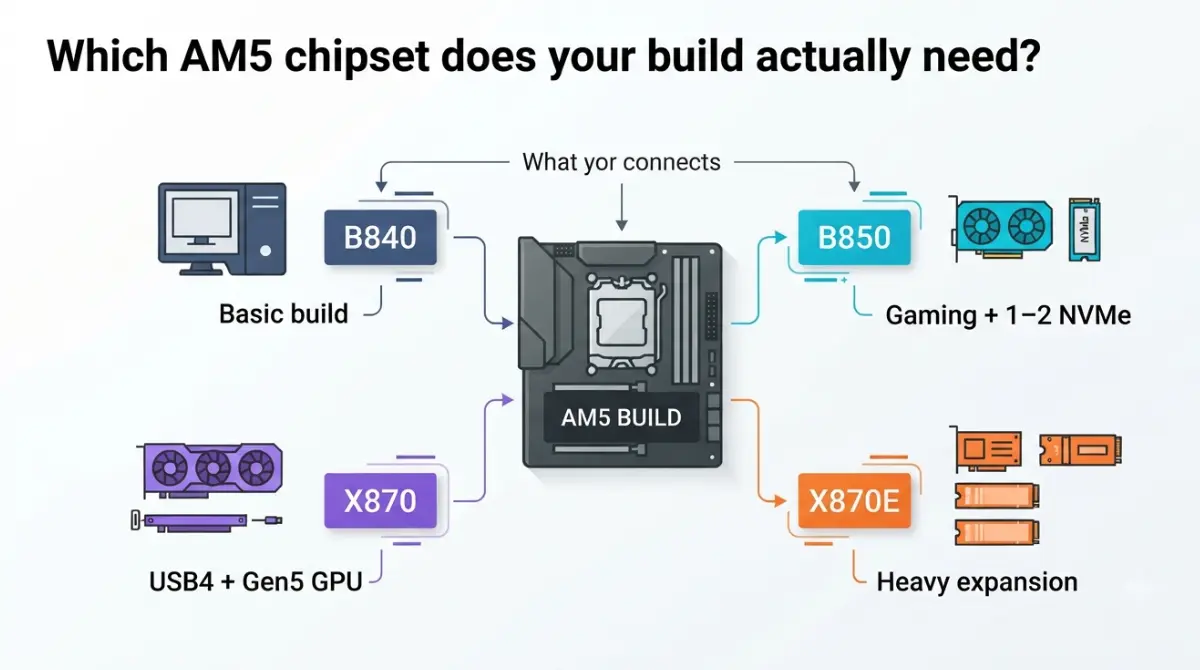
Table of Contents
Which AM5 chipset does your build actually need?
The right AM5 chipset depends on what you plug in, not on how fast your processor is.
The one-line answer by build type
- One graphics card and one or two SSDs: B850 covers it, including a PCIe 5.0 slot for your main NVMe drive.
- You need USB4 ports: start at X870, where USB4 is standard.
- Several high-bandwidth cards or drives: choose X870E, which has the largest lane and port budget.
- A basic build with no CPU overclocking: B840 works, if you accept the limits explained below.
What this comparison covers (and skips)
This guide compares AMD’s four 800-series chipsets using AMD’s own spec table. Older 600-series boards come up only where they’re a cheaper alternative.
What an AM5 chipset controls, and what it doesn’t
A chipset adds extra connections to a motherboard, but your graphics card and main SSD don’t route through it.
CPU-direct lanes vs chipset lanes
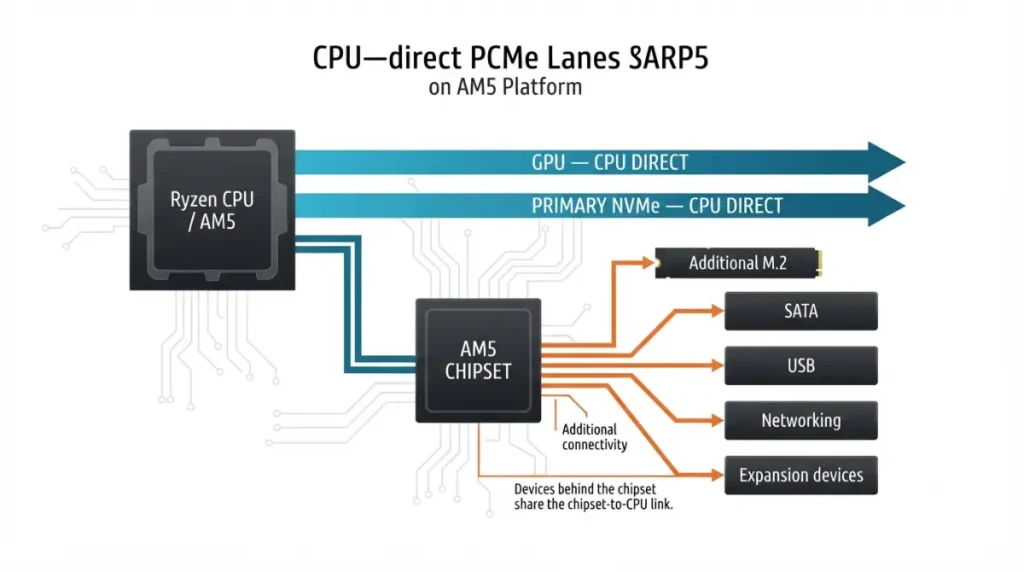
On AM5, the graphics slot and the primary NVMe slot connect straight to the Ryzen processor. The chipset supplies everything else: extra M.2 slots, SATA ports, USB and networking. So the chipset mostly decides how much you can connect, not how your graphics card is wired.
🔍 Why It Works: PCIe lanes are data paths. Everything attached to the chipset shares the chipset’s single link back to the CPU, so the chipset adds ports and slots rather than extra speed for your GPU.
Every AM5 board runs every AM5 Ryzen
AMD states that every AM5 board with a 600- or 800-series chipset supports Ryzen 7000, 8000 and 9000 processors. A 600-series board may need a BIOS update first for Ryzen 8000 or 9000.
🧩 Compatibility Check: Before ordering, open your exact board’s CPU support list and confirm both your processor and the minimum BIOS version it requires.
X870E vs X870 vs B850 vs B840 side by side
AMD’s official spec table, reorganized so you can compare the four chipsets feature by feature:
The official spec table
| Feature | X870E | X870 | B850 | B840 |
|---|---|---|---|---|
| Graphics lanes (from CPU) | 1×16 or 2×8, PCIe 5.0 | 1×16 or 2×8, PCIe 5.0 | 1×16 or 2×8, PCIe 4.0 | 1×16, PCIe 4.0 |
| Main NVMe (from CPU) | 1×4 PCIe 5.0 + 4 GPP | 1×4 PCIe 5.0 + 4 GPP | 1×4 PCIe 5.0 | 1×4 PCIe 4.0 |
| Usable lanes total / PCIe 5.0 | 44 / 24 | 36 / 24 | 36 / 4 | 34 / 0 |
| CPU overclocking | Yes | Yes | Yes | No |
| DDR5 overclocking (EXPO) | Yes | Yes | Yes | Yes |
| USB4 | Standard | Standard | Optional | Optional |
| USB 20 / 10 / 5 Gbps (up to) | 2 / 12 / 2 | 1 / 6 / 1 | 1 / 6 / 1 | — / 2 / 2 |
| SATA ports (up to) | 8 | 4 | 4 | 4 |
| Best for | Heavy expansion | USB4 + Gen5 GPU | Most gaming builds | Basic builds |
Source: AMD’s official AM5 chipset specifications, checked September 2026. These are platform maximums; individual boards may expose fewer slots or ports. “GPP” = general-purpose lanes the board maker can assign.
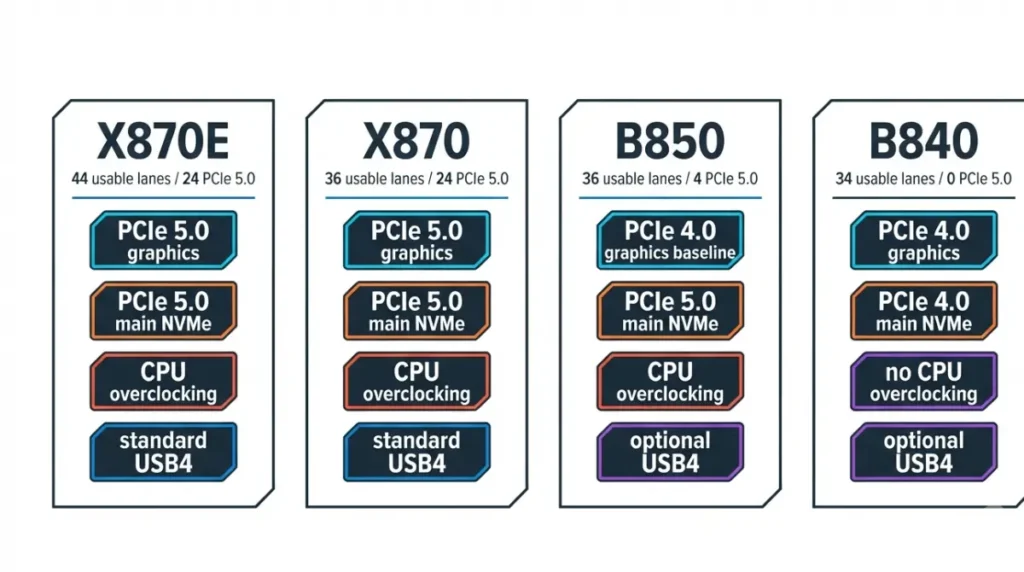
The three rows that matter most
- USB4: standard only on X870E and X870. On B850 and B840, it’s the board maker’s choice.
- PCIe 5.0 graphics: guaranteed only on X870E and X870. B850’s baseline is PCIe 4.0, and B840 has no PCIe 5.0 lanes at all.
- Usable lanes: X870E’s 44, against 36 on X870 and B850, is what pays for its extra slots and ports.
X870E vs X870: what the extra E actually buys
In the 800 series, the “E” means extra connectivity from the chipset, not a faster graphics slot.
Two chipset dies vs one
X870E boards use two linked chipset chips, while X870 uses one. That second chip is why AMD lists 44 usable lanes on X870E versus 36 on X870, plus double the SATA and 10Gbps USB counts. Both chipsets carry the same PCIe 5.0 graphics and NVMe guarantees.
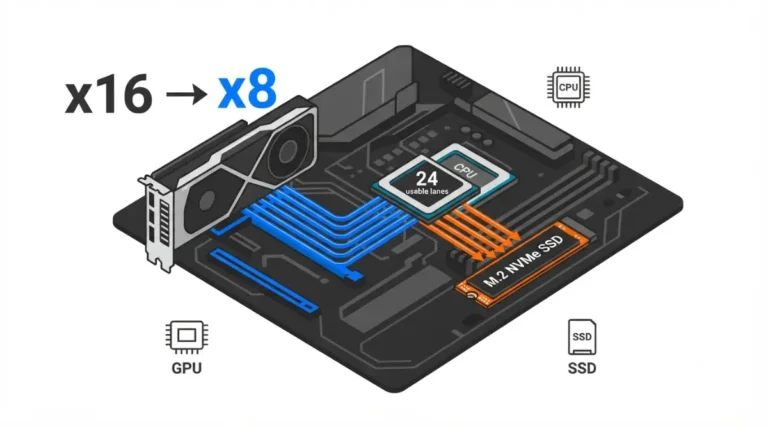
X870E makes sense if you’ll fill several M.2 slots, add a capture or network card, or run two graphics slots at x8/x8. It also helps to understand how some boards drop the graphics slot to x8 when an M.2 slot is used.
Wi-Fi 7 and VRMs are board choices, not chipset features
Some comparison pages describe Wi-Fi 7 as guaranteed on X870-class boards. AMD’s chipset table doesn’t include Wi-Fi at all, and power delivery (VRM) quality isn’t a chipset spec either.
✅ Do This: Confirm Wi-Fi version, VRM design and M.2 slot count on the specific board’s spec page, not from the chipset name.
B850 vs B840: why they’re not neighbors
Despite the similar names, B840 sits much closer to AMD’s entry-level A620 than to B850.
What B840 removes
Compared with B850, AMD’s table shows B840 drops CPU overclocking, 20Gbps USB, every PCIe 5.0 lane, and the x8/x8 graphics split, while keeping EXPO memory overclocking. B850 guarantees a PCIe 5.0 x4 slot for your main NVMe drive. Its graphics baseline is PCIe 4.0, though some board makers wire the slot for PCIe 5.0.
The PCIe 3.0 myth, corrected
Pre-launch reports said B840’s graphics slot would be capped at PCIe 3.0. AMD’s final table lists B840’s CPU-connected x16 slot and main M.2 at PCIe 4.0; the PCIe 3.0 limit applies to lanes from the chipset itself. On ASUS’s PRIME B840-PLUS WIFI spec sheet, for example, the x16 slot runs PCIe 4.0 from the CPU, while the chipset’s M.2_3 slot is PCIe 3.0 x4.
Should you buy 800-series or a cheaper 600-series board?
An older 600-series board can match an 800-series one for many builds, and sometimes offers more connectivity.
X870 vs X670 and B850 vs B650
AMD’s table gives X670 44 usable lanes, 8 SATA ports and up to 12 10Gbps USB ports, more chipset connectivity than X870. What X870 adds is standard USB4 and a guaranteed PCIe 5.0 graphics slot. B850’s main change over B650 is that its PCIe 5.0 NVMe slot is guaranteed rather than optional.
| Your build | 800-series minimum | 600-series alternative | Key detail |
|---|---|---|---|
| One GPU, 1–2 NVMe drives | B850 | B650 | PCIe 5.0 NVMe optional on B650: check the board |
| Rear USB4 needed | X870 | X670E / X670 | USB4 optional on 600-series: board must list it |
| Many drives, add-in cards, x8/x8 | X870E | X670E / X670 | Same two-chip I/O budget |
| Basic build, no CPU overclocking | B840 | A620 | Both have zero PCIe 5.0 lanes |
Source: The Silicon Scroll decision matrix, built from AMD’s AM5 chipset specifications and AMD’s AM5 quick reference guide. Checked September 2026.
AM5 support through 2029
AMD has committed to supporting Socket AM5 through 2029, so any of these boards has a stated path for future Ryzen CPUs. AMD hasn’t announced a new chipset as of September 2026. Future processors will still need the right BIOS version for your CPU.
Check lane sharing before you buy any AM5 board
The same chipset can behave differently on two boards, because each maker decides which slots share PCIe lanes.
USB4 can borrow M.2 lanes
On MSI’s MAG X870 TOMAHAWK WIFI, the M2_2 slot and the rear USB4 ports share the CPU’s PCIe 5.0 x4 lanes. On MSI’s X870 GAMING PLUS WIFI, the USB4 ports share with nothing. It’s the same chipset with a different trade-off, which is why PCIe lane sharing on motherboards deserves a check before purchase.
Where to find the sharing table in a manual
Look for a “bandwidth sharing” note or an expansion-slot table in the board’s manual or spec page. MSI publishes one for each board in its lane-sharing breakdown for X870E and X870 boards.
⚠️ Watch Out: Filling a shared M.2 slot can cut bandwidth to a USB4 port or a PCIe slot. Read the sharing table before you buy, not after the drives arrive.
Frequently asked questions
1. Is B850 good enough for a gaming PC?
For one graphics card and one or two SSDs, B850 covers it. The GPU and main NVMe drive connect directly to the Ryzen CPU.
2. Does every X870 motherboard have Wi-Fi 7?
No. AMD’s X870 chipset specifications don’t include Wi-Fi, so Wi-Fi 7 depends on the specific board. Check its spec page.
3. Can you overclock a CPU on a B840 motherboard?
No. AMD lists CPU overclocking as not enabled on B840, though EXPO memory overclocking is still supported.
4. Do 800-series boards support Ryzen 7000 processors?
Yes. AMD says every AM5 board with a 600- or 800-series chipset supports Ryzen 7000, 8000 and 9000 processors.
5. Is X870 better than X670?
Not always. X870 adds standard USB4 and PCIe 5.0 graphics, but X670 offers more usable lanes, SATA ports and USB.
6. What does the E in X870E mean?
In the 800 series, E signals extra chipset connectivity: 44 usable PCIe lanes versus X870’s 36, with identical PCIe 5.0 guarantees.
7. Does B840 support PCIe 5.0?
No. AMD lists zero PCIe 5.0 lanes on B840. Its CPU-connected graphics slot and main M.2 slot run at PCIe 4.0.
8. Does B850 have a PCIe 5.0 graphics slot?
Not by default. AMD’s B850 baseline is a PCIe 4.0 graphics slot. Some boards add PCIe 5.0, so check the board’s spec page.
9. Does USB4 share lanes with an M.2 slot?
On some boards, yes. MSI’s MAG X870 TOMAHAWK WIFI shares CPU PCIe 5.0 x4 lanes between its M2_2 slot and rear USB4 ports.
10. Will AM5 motherboards support future Ryzen CPUs?
AMD has committed to AM5 support through 2029. Check your board’s CPU support list for the BIOS version each new processor needs.
Pick the chipset, then check the board
Use the matrix above as your starting point: B850 for most single-GPU builds, X870 when you need USB4, X870E for heavy expansion, and B840 only for basic builds. Then confirm the specific board’s lane-sharing table and CPU support list. Every spec here comes from AMD’s or board makers’ published documentation; we didn’t test these boards.
For the full pre-order checklist, see our guide to getting motherboard compatibility right before you order. To confirm your processor fits, read how to check CPU and motherboard socket and chipset compatibility.