M.2 slot disables a SATA port: which one, on which boards

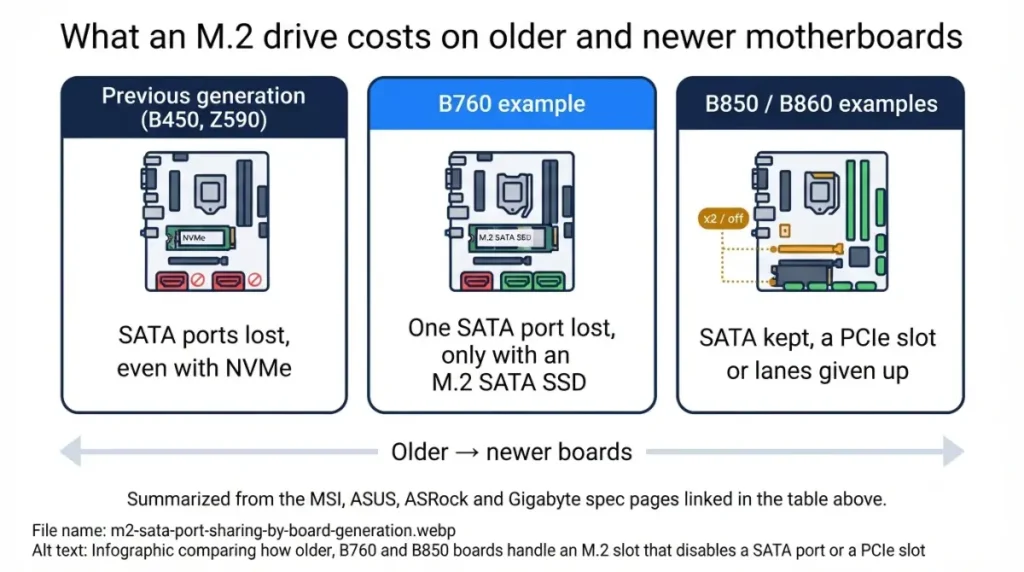
Older boards like the MSI B450 TOMAHAWK MAX lose SATA5 and SATA6 to any M.2 drive, while two B850 boards trade PCIe lanes or a slot instead.
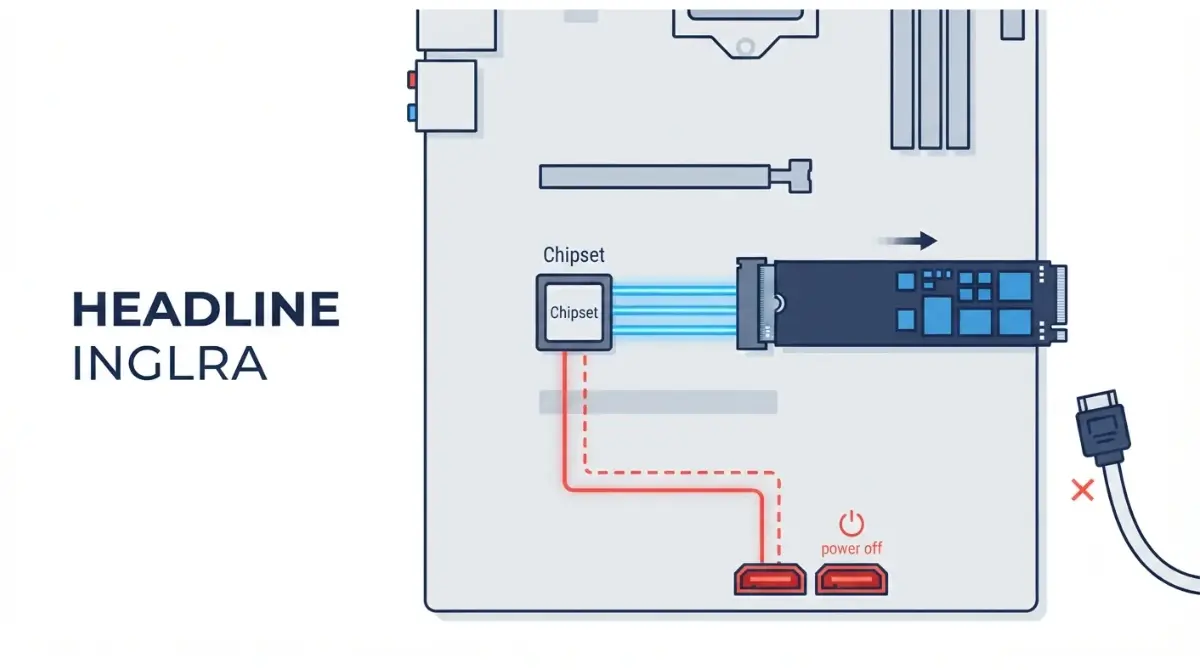
Table of Contents
On many motherboards, putting a drive in one particular M.2 slot switches off one or two SATA ports, and any drive cabled to those ports drops out of the BIOS and Windows. Move that drive’s cable to a SATA port your board’s M.2 footnote doesn’t name, and it comes back without anything being written to it.
Which ports go dark depends on the board model and the slot. On some boards it also depends on whether the M.2 drive is NVMe or SATA.
A shared SATA port goes dark by design
The chipset has a fixed set of high-speed lanes, and the board maker decides what each one feeds. Intel’s 700-series chipset datasheet calls this Flexible I/O: some of the chipset’s high-speed lanes can be set up for a PCIe controller, a USB controller, Ethernet or the SATA controller. AMD’s AM5 quick reference guide lists each chipset’s maximum SATA ports with “or PCIe 3.0” in the same column, the same either-or choice.
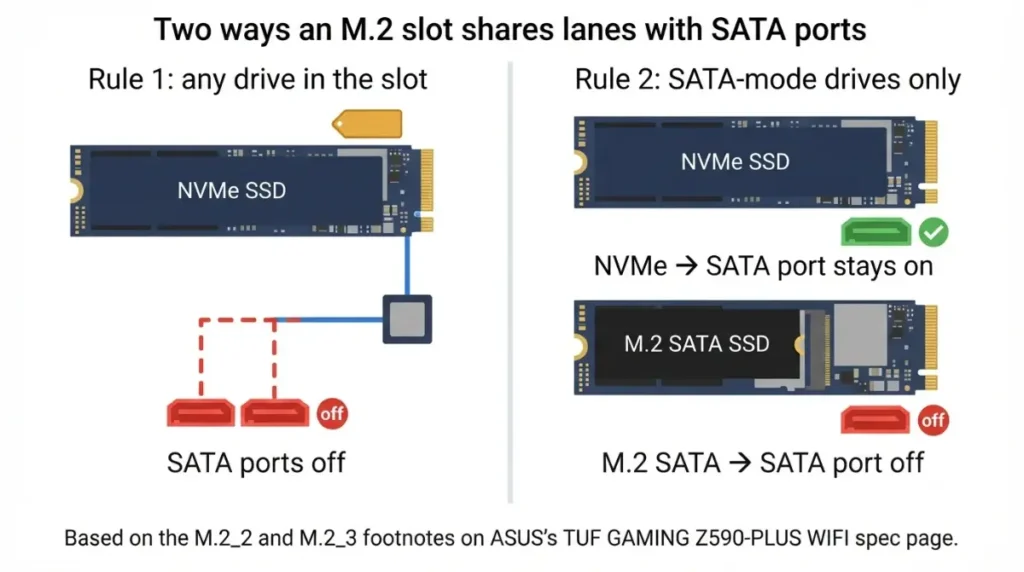
When a board wires one lane group to both an M.2 slot and a SATA port, only one of them works at a time. Some boards switch the SATA port off whenever the slot holds any drive. Others do it only when the M.2 drive runs in SATA mode, because that drive then takes a SATA channel for itself. To see how many lanes each AMD chipset has to divide, open the AM5 chipset comparison.
Ports and slots lost on eight boards
Each row comes from the board maker’s spec page, and the wording follows that page’s own port and slot names.
| Board (chipset) | M.2 slot | What sets it off | What you lose |
|---|---|---|---|
| MSI B450 TOMAHAWK MAX (B450, previous generation) | M.2 | Any M.2 device | SATA5 and SATA6 |
| ASUS TUF GAMING Z590-PLUS WIFI (Z590, previous generation) | M.2_2 | A drive running in SATA mode | SATA6G_2 |
| ASUS TUF GAMING Z590-PLUS WIFI | M.2_3 | Any drive | SATA6G_56 |
| MSI PRO B760M-A WIFI (B760) | M2_2 | An M.2 SATA SSD | SATA8 |
| ASUS PRIME B650M-A AX II (B650) | None | Some Ryzen 8000 Series processors | SATA6G_E34 ports |
| MSI MAG B850 TOMAHAWK MAX WIFI (B850) | M2_3 | Any drive | No SATA port; PCI_E3 runs at x2 |
| ASRock B850 Riptide WiFi (B850) | M2_4 | Any drive | No SATA port; PCIE2 is disabled |
| ASUS ROG STRIX B860-A GAMING WIFI (B860) | M.2_4 | The PCIEX16(G4) slot in use | No SATA port; M.2_4 itself is disabled |
| Gigabyte B850 AORUS ELITE WIFI7 (B850) | None listed | None listed | No sharing note in its storage specs |
Sources: MSI lists SATA5 and SATA6 as unavailable with an M.2 device installed; ASUS ties SATA6G_2 to M.2_2 in SATA mode and SATA6G_56 to an occupied M.2_3; MSI’s B760 note covers an M.2 SATA SSD in M2_2 only; ASUS says SATA6G_E34 is disabled with some 8000 Series processors; MSI notes PCI_E3 runs at x2 with a device in M2_3, and switching it to x4 in the BIOS disables M2_3; ASRock states PCIE2 is disabled when M2_4 is occupied; ASUS ROG says M.2_4 is disabled while PCIEX16(G4) is operating; Gigabyte’s storage section carries only a RAID 5 footnote.
The two previous-generation boards lose SATA ports even with an NVMe drive in the shared slot. The B760 board gives up SATA8 only for an M.2 SATA SSD. The B850 and B860 boards in the table trade an M.2 slot against a PCIe slot or lane width instead, and where PCIe lane sharing costs you a slot covers that side of it.
NVMe or M.2 SATA: check the drive first
The drive’s label or product page settles it. M.2 is only the form factor, and an M.2 drive can run SATA or NVMe, so the listing will say NVMe (or PCIe) or SATA.
The notches on the gold edge are a weaker clue. Dell’s M.2 guide says SATA SSDs tend to use B-keys, but PCIe x2 drives can carry both B and M keys, while PCIe x4 drives use M-keys only. A drive with two notches can still be NVMe.
This decides the outcome on a board like the MSI PRO B760M-A WIFI, where only an M.2 SATA SSD in M2_2 costs you SATA8. Some current boards don’t take M.2 SATA drives at all: MSI’s spec sheet for the MAG B850 TOMAHAWK MAX WIFI lists SATA mode as N/A on all four M.2 slots.
Getting the missing drive back without touching its data
- Shut down the PC and switch off the power supply.
- Open your board’s spec page or manual and find the note for the M.2 slot you just filled. ASUS’s troubleshooting FAQ gives an example board where M.2_1 shares with SATA6G_1, so SATA6G_1 is disabled while both are in use.
- Move the missing drive’s SATA data cable to a port the note doesn’t name. In the ASUS example, that means SATA6G_3 or SATA6G_4.
- Enter the BIOS and confirm the drive is listed. MSI’s storage detection guide points to the BIOS “System Status” page for this check.
- Boot Windows and open Disk Management to confirm the drive and its partitions are listed.
Stop if: Windows offers to initialize the disk, or shows it as unallocated, and it held files before the M.2 went in. Microsoft’s Disk Management guide warns that initializing erases all data on the disk. Cancel the prompt. MSI’s guide suggests creating a new volume on unallocated space, but only do that on a drive with nothing on it.
Which M.2 slot to fill first
ASRock’s B850 Riptide WiFi page names M2_1 as the first priority for M.2 installation, and on that board it’s a CPU-attached slot. Across the table, the first M.2 slot carries no SATA note on every board except the MSI B450 TOMAHAWK MAX.
That board has one M.2 slot, and any drive in it takes SATA5 and SATA6 away. Four SATA ports remain while it’s filled.
On a board where the shared slot only objects to SATA mode, such as the PRO B760M-A WIFI, an NVMe drive in M2_2 leaves SATA8 working. If you plan to fill every slot, how many M.2 slots you can use at once shows what each extra drive costs.
Still missing on a free port?
When no footnote names the port the drive is on, lane sharing isn’t the cause. Check these in order:
- The processor. On the ASUS PRIME B650M-A AX II, the SATA6G_E34 ports are disabled with some 8000 Series processors, whatever sits in the M.2 slots.
- The SATA controller. The ASRock B850 Riptide WiFi runs its four SATA ports from an ASMedia ASM1061 controller, and its storage notes tie none of them to an M.2 socket.
- The cable and power lead. Swap in a known-good SATA data cable and a different power connector.
If the BIOS still lists no drive on any free port, contact the board maker’s support. Tell them the board model, the BIOS version, which M.2 slot is filled and which SATA ports you tried.
Match your next SSD to a slot that keeps your SATA ports
Before ordering another SSD, open the Storage section of your board’s spec page and read the footnote for the slot it will go in. On the Z590 and B760 boards above, a note worded around SATA mode spared NVMe drives. A note about the slot simply being occupied did not.
Before you buy: if every SATA port already has a drive on it, pick a slot whose footnote names a PCIe slot or nothing at all, as the B850 boards in the table do.
The rest of the motherboard compatibility checks cover the other limits to confirm on the same board before you order.
Found this helpful? See more of our guides on Google.
Want to see our guides first on Google?