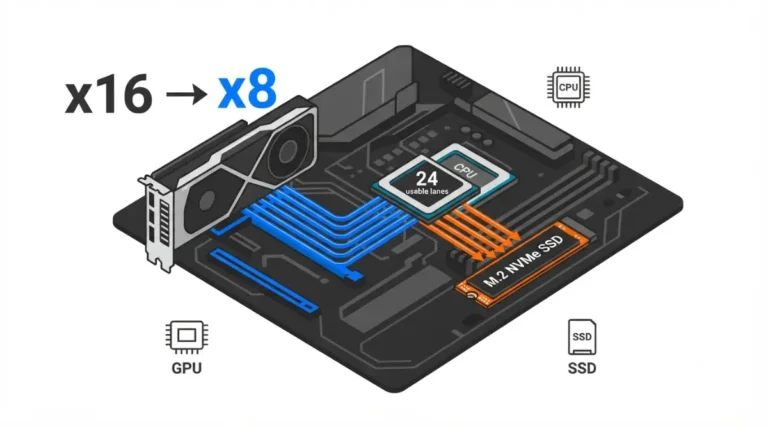
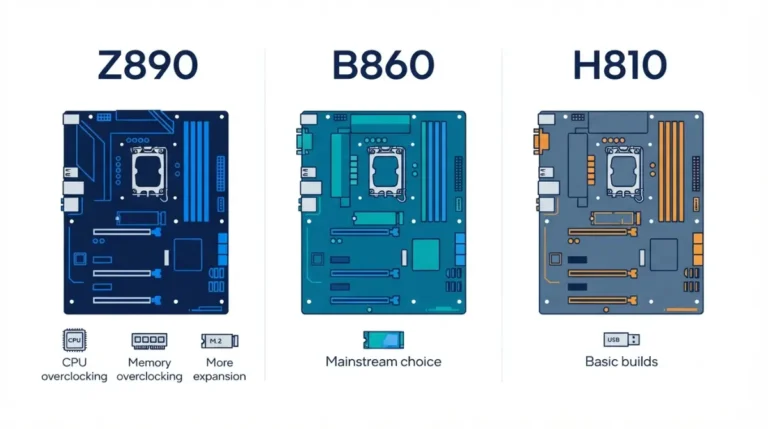
Where PCIe lane sharing costs you a slot on your motherboard
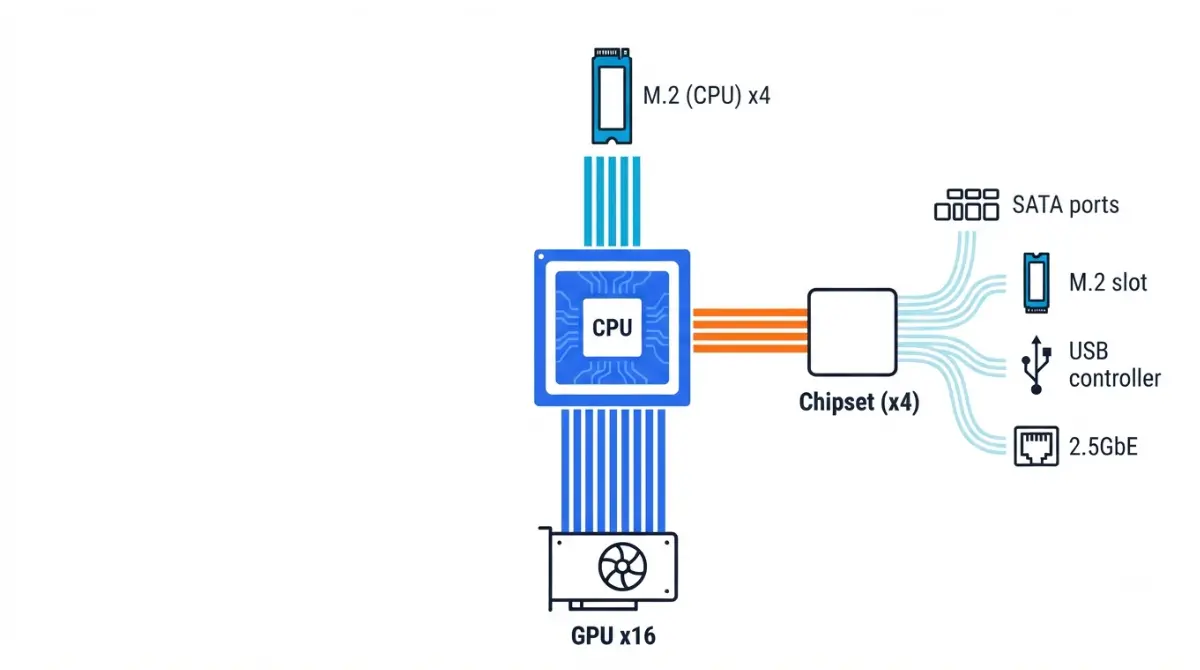
Table of Contents
Your board has more slots than your CPU has lanes
Every motherboard offers more slots and ports than the processor can feed directly. That gap is why your manual carries a line like “M2_2 shares bandwidth with SATA6G_5/6,” and why a PCIe lane sharing motherboard footnote can quietly cost you a port.
Start where you are:
- Choosing a board: read the next three sections, then plan your drives around the conflict matrix.
- Parts on the desk: go straight to the conflict matrix and the five-minute manual check.
- A drive vanished, or your GPU reads x8: jump to the troubleshooting section.
Lane routing is one piece of a larger question, and the rest of it lives in our guide to checking full motherboard compatibility before you order. Every rule below is sourced to manufacturer documentation, and your own board’s manual overrides all of it.
What PCIe lane sharing actually means
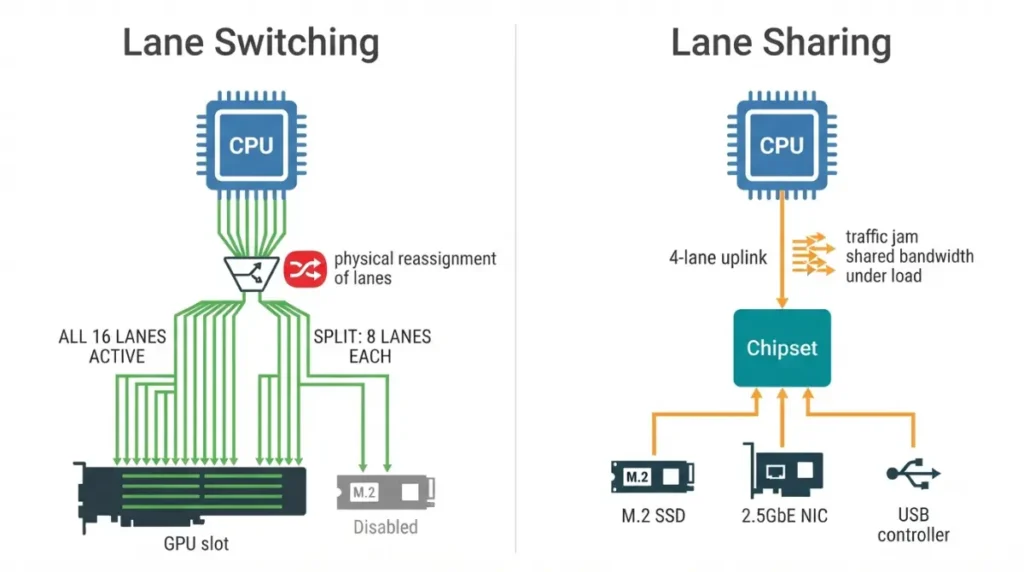
PCIe lane sharing is when two or more devices on a board depend on the same lanes or the same link back to the processor, so using one reduces or disables the other. A lane is a single point-to-point connection defined by the PCI-SIG standard; x1, x4, x8 and x16 describe how many lanes a slot uses, and each generation roughly doubles the data rate per lane.
Two different behaviours get called sharing, and separating them explains almost everything else.
| Behaviour | What happens | Key detail |
|---|---|---|
| Lane switching | Lanes are wired to one device or another, never both | Populating a socket physically takes lanes from a slot — an x16 becomes x8 |
| Lane sharing | Several devices sit behind one narrower link to the CPU | Nothing is disabled; devices compete only during simultaneous transfers |
Source: behaviour as described in manufacturer board documentation; lane definition per the PCI Express specification (PCI-SIG).
🔍 Why It Works: A slot’s physical length tells you nothing about its electrical width or where its lanes come from. A full-length x16 slot can be wired for four lanes, or for none at all when a neighbouring socket is filled.
Where your CPU’s lanes go before you plug anything in
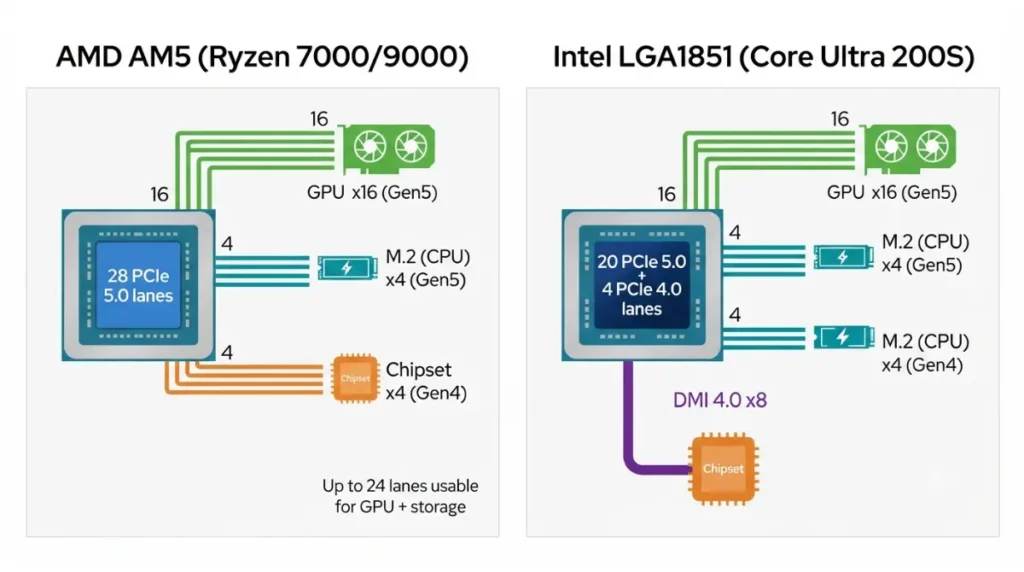
Most CPU lanes are spoken for by design: graphics, one or two direct M.2 sockets, and the link down to the chipset. There is no spare pool.
| Platform | Graphics | CPU-attached M.2 | Link to chipset | Key detail |
|---|---|---|---|---|
| AMD AM5 (Ryzen 7000 / 9000) | x16 Gen 5, or 2× x8 | x4 Gen 5, plus x4 general-purpose | x4 PCIe 4.0 | 28 lanes total; AMD lists up to 24 usable |
| Intel LGA1851 (Core Ultra 200S) | x16 Gen 5 | x4 Gen 5 and x4 Gen 4 | DMI 4.0 x8 | 20 Gen 5 + 4 Gen 4 lanes, DMI separate |
Source: AMD’s AM5 chipset specification table and Intel’s published processor specifications, read September 2026. Figures are platform-level; individual boards wire them differently.
Ryzen 7000 and 9000 processors connect to high-bandwidth components through 28 PCIe lanes with PCIe 5.0 support, and AMD’s own quick reference gives the usable figure as up to 24 PCIe 5.0 lanes for graphics and storage — the difference being the four lanes running down to the chipset. On the Intel side, all Arrow Lake desktop parts provide 20 PCIe 5.0 lanes and 4 PCIe 4.0 lanes, plus an 8-lane DMI 4.0 bus to the chipset, which means a Gen 5 NVMe SSD no longer subtracts lanes from the x16 graphics slot.
🧩 Compatibility Check: Open your exact processor’s specification page or AMD’s AM5 chipset table and read the lane count and PCIe revision for that model, not the series. The series page will not tell you what your chip does.
The chipset’s lanes, and the one link they all cross
The chipset multiplies your connectivity, but everything behind it reaches the processor through a single fixed-width link. Current Intel Z-series chipsets connect over a DMI 4.0 x8 bus and put out 24 downstream PCIe Gen 4 lanes; on AM5, the chipset reaches the CPU over four PCIe 4.0 lanes, with dual-chipset boards daisy-chaining a second chip behind the first.
That is the permanent, unavoidable instance of sharing on every modern board. It matters only when several chipset devices move large amounts of data at once — an SSD, a capture card and a 10GbE controller all working together. One chipset SSD copying a file is not competing with anything.
📊 Spec Check: AMD’s published chipset table lists X870E at 44 usable lanes in total with up to 24 of them at PCIe 5.0, and X870 at 36 usable. Both list up to 24 PCIe 5.0 lanes, so the difference between them is expansion capacity, not Gen 5 speed.
🔍 Why It Works: This is why two identical-looking M.2 sockets behave differently. One is wired straight to the CPU; the other sits behind the chipset and shares the uplink with your USB, network and SATA controllers.
What gets disabled when: the conflicts to expect
Only boards that switch lanes between sockets will change your graphics slot’s width — and which ones do is a per-board decision, never a chipset rule.
| What you populate | What typically changes | Mechanism | Where it’s documented |
|---|---|---|---|
| A second CPU-linked M.2 | x16 slot drops to x8 | Switching | Manual: expansion slot notes |
| A chipset M.2 socket | Named SATA ports disabled | Switching | Manual: storage configuration table |
| A lower x16-length slot | Upper slot splits, or x1 slots vanish | Switching | Product page slot footnotes |
| Several chipset devices at once | Slower concurrent transfers only | Sharing | Block diagram |
Source: sharing and switching behaviour as published in MSI’s lane bifurcation and bandwidth-sharing document for its current AM5 boards, which states that on those boards the two main PCIe slots share the CPU’s PCIe 5.0 x16 lanes, while a third slot and an M.2 socket share the chipset’s PCIe 4.0 x4 lanes. That is one manufacturer’s wiring for one board family — an example, not a universal rule.
Halving a graphics slot’s bandwidth costs less than most builders fear. In TechPowerUp’s scaling test of the RTX 5090, running at PCIe 4.0 x16 — the same bandwidth as Gen 5 x8 — cost about 1% of performance across all three tested resolutions, with dropping to a quarter of the bandwidth costing roughly 4% at 1080p and 1440p and closer to 2% at 4K.
Creator workloads are more sensitive. Testing by Puget Systems, reported by TechPowerUp, found that quarter-bandwidth configurations slowed content-creation work by about 10%, with further reductions pushing render times up by roughly 25%.
⚠️ Watch Out: Never assume a board behaves like its chipset. Two X870E boards can route the same lanes to completely different sockets, and the chipset table will not tell you which. The SATA case has its own walkthrough in what to do when an M.2 drive disables a SATA port.
How to find your board’s lane-sharing rules in five minutes
Four steps, and they work on any board from any vendor:
- Open the product page for your exact board model and read the footnotes under Expansion Slots and Storage. Most sharing rules are stated there in small type.
- Download the manual for your board revision, not just the model, and find the storage configuration table or the notes headed “Installation Notices.”
- Look for the block diagram, usually in the manual’s first pages. It shows which sockets come from the CPU and which from the chipset.
- After building, confirm what the slot actually negotiated in a hardware-information utility, rather than assuming.
✅ Do This: Before you order, list every drive and card you plan to install, then write down what your manual says each socket costs you. If the list needs more sockets than your board can serve at once, change the board, not the plan.
A drive vanished or your GPU reads x8: what to check
A missing drive after an upgrade is usually a documented design choice, not a fault.
| Symptom | Likely cause | Your check |
|---|---|---|
| SATA drive gone after adding M.2 | That socket disables named SATA ports | Manual storage table; move the cable |
| x16 slot reports x8 | Lanes switched to a populated socket | Manual slot notes; try the other M.2 socket |
| Add-in card sees only one device | Board doesn’t offer the needed bifurcation | Manual and BIOS slot configuration |
Source: causes as documented in manufacturer board documentation; see the sharing rules cited above.
Splitting one slot across multiple devices needs board-level bifurcation support, which is set in firmware — our guide to reading and updating your board’s BIOS covers where those settings live. If a device survives all three checks, contact your board manufacturer’s support with the socket name and your board revision.
PCIe lane sharing: quick answers
1. What is PCIe lane sharing on a motherboard?
PCIe lane sharing is when several devices depend on the same lanes or the same link to the CPU, reducing or disabling one another.
2. What’s the difference between CPU lanes and chipset lanes?
CPU lanes run directly to the processor. Chipset lanes reach it through one fixed-width uplink shared by all chipset devices.
3. How many PCIe lanes does my CPU have?
AM5 processors carry 28 lanes with up to 24 usable; current Intel desktop parts provide 20 Gen 5 plus 4 Gen 4.
4. Does a second M.2 SSD slow down my graphics card?
Only on boards that switch lanes between that socket and the x16 slot. Your manual’s slot notes state whether yours does.
5. Why did two SATA ports stop working when I added an M.2 drive?
That M.2 socket switches lanes with those named SATA ports. Move the SATA cables to ports your manual leaves available.
6. Is a graphics card at x8 slower than at x16?
TechPowerUp measured roughly 1% loss at half bandwidth on an RTX 5090 across three resolutions in game testing.
7. Do all M.2 slots on a board run at the same speed?
No. One socket is usually CPU-attached and fastest; others run through the chipset at lower generations or widths.
8. What is PCIe bifurcation?
Splitting one slot’s lanes across multiple devices, such as x8/x8. Support is per-board and set in BIOS.
9. Does the chipset link limit my second SSD?
Only during simultaneous heavy transfers, when several chipset devices compete for the single uplink back to the processor.
10. Where is the lane-sharing table in my motherboard manual?
Under storage configuration or expansion slot notes, in the manual matching your board revision, usually beside the block diagram.
Your next step
Open your board’s manual before you buy another drive, and write down what each socket costs you. That one page settles more build questions than any spec sheet. If your graphics slot is the concern, our guide to matching a graphics card to your board and case covers width and clearance; for the layer beneath all of this, start with socket and chipset compatibility. Every figure above is sourced, and none of it came from hardware we tested.