Which Module Fits? Clear Steam Machine RAM Compatibility Answers
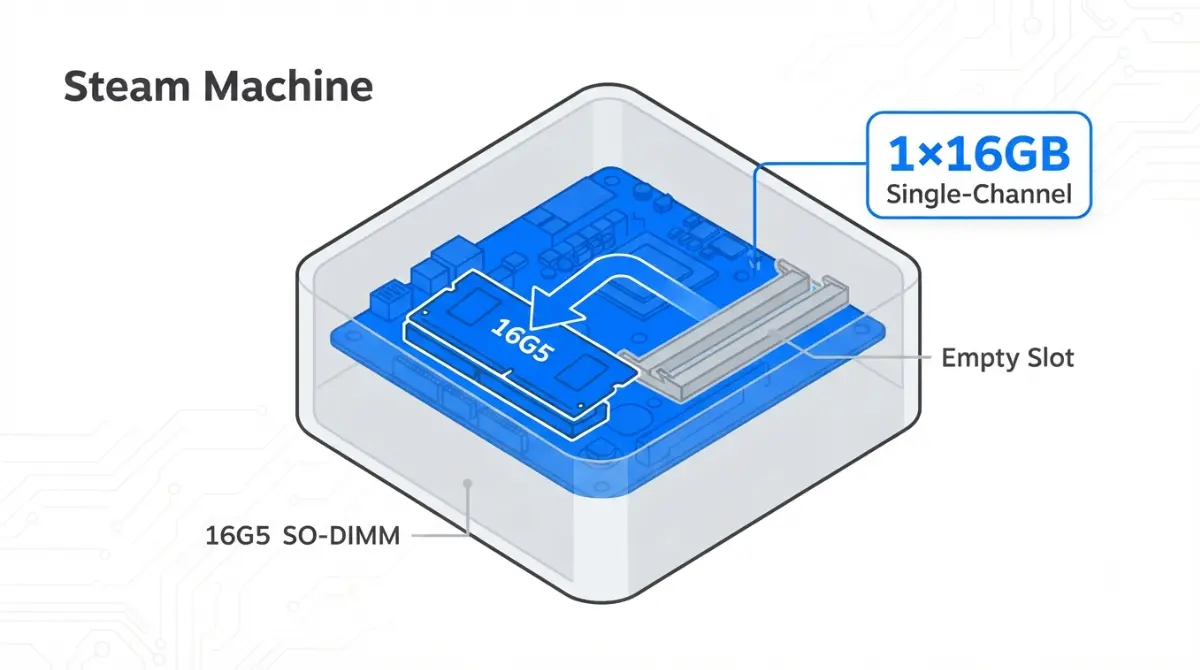
Table of Contents
What RAM does the Steam Machine ship with?
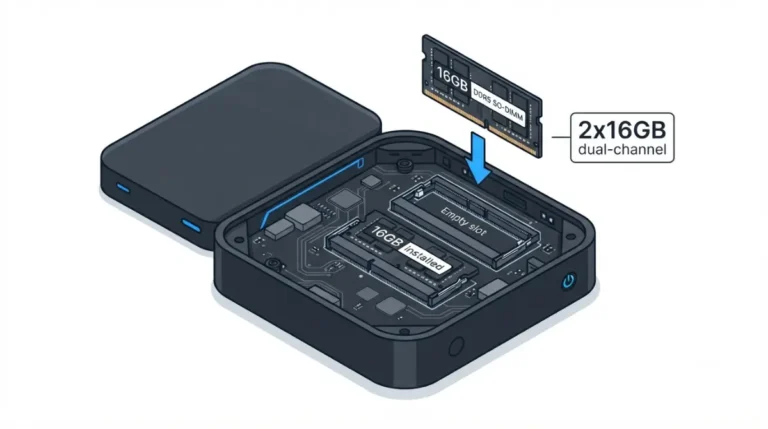
The Steam Machine ships with one 16GB DDR5-5600 SO-DIMM in a two-slot memory bay, so it runs in single-channel mode. Own one, weighing a purchase, or fixing a swap that won’t boot? Jump to the module matrix, the upgrade decision, or boot troubleshooting below.
Stock memory: one 16GB module
Valve told VideoCardz in June that every unit has two slots with one filled, and it has no plans to change that.
📊 Spec Check: Valve’s hardware page lists 16GB DDR5 plus 8GB GDDR6 VRAM.
Why 2x8GB still gets searched
Valve first said units might ship with two 8GB sticks, then told Gamers Nexus it misspoke, per TechRadar; two 8GB sticks was the original plan, dropped over supply. For other limits, see Steam Machine specs and upgrade limits.
ℹ️ Risk Note: Replacing the memory means opening the console, including the area around its built-in power supply. Unplug it first, follow Valve’s and iFixit’s guide exactly, and check your warranty terms before starting.
Which RAM is compatible with the Steam Machine?
Valve recommends DDR5-5600 or faster SO-DIMMs and advises against mixing capacities, speeds or timings, per its Steam Support reply as reported by Notebookcheck.
What Valve recommends: matched modules
Match capacity, speed and timings; nothing below DDR5-5600.
What Valve doesn’t publish: a tested-kit list
No Valve tested-kit list was found, so treat this as guidance, not certification. Gamers Nexus reported boot instability with some DDR5 SO-DIMMs, as relayed by TechPowerUp.
Configuration matrix
| Configuration | Total | Mode | Status |
|---|---|---|---|
| 1x16GB (stock) | 16GB | Single | Ships from Valve |
| Stock + matching 16GB | 32GB | Dual | Added in Gamers Nexus test |
| 2x8GB | 16GB | Dual | Valve’s dropped plan; no test found |
| 2x32GB | 64GB | Dual | ETA Prime demo; no Valve maximum found |
| Mixed modules | — | — | Valve advises against |
Source: Valve statements as reported by VideoCardz and Notebookcheck; Gamers Nexus test via VideoCardz; ETA Prime demonstration via Korben. No prices. Checked October 2, 2026.
Is 2x8GB faster than 1x16GB in the Steam Machine?
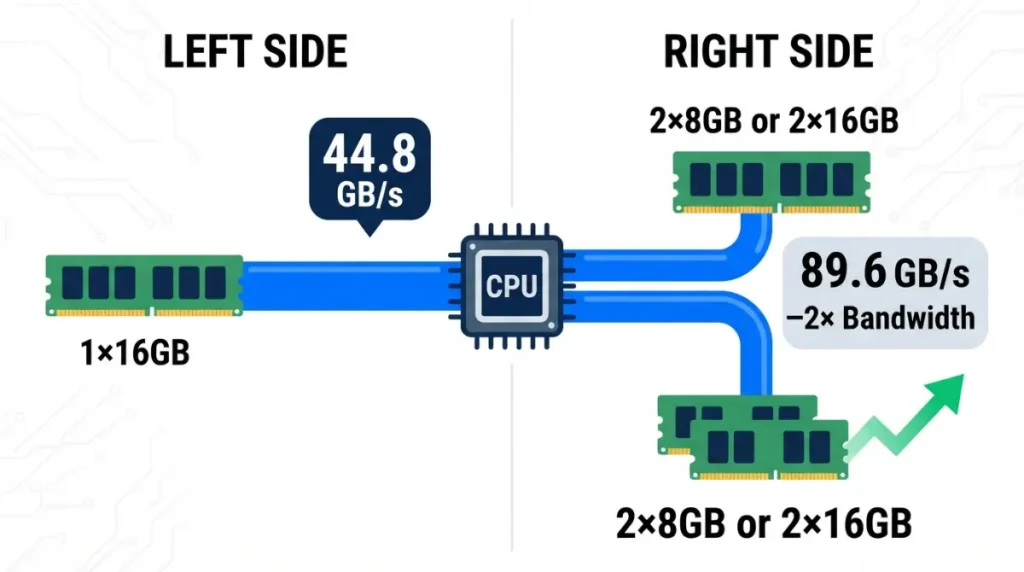
Both layouts hold 16GB; the difference is channel mode, and the only Steam Machine test found compared 1x16GB with 2x16GB, not 2x8GB.
Same capacity, different channel mode
🔍 Why It Works: Dual-channel doubles the memory bus width. At 5600 MT/s on a 64-bit bus, peak theoretical bandwidth is about 44.8GB/s for one module and 89.6GB/s for two, derived from the spec, not measured.
What the published test measured
Gamers Nexus’s single- vs dual-channel test compared the stock single stick with an added second 16GB module, keeping the suite within 16GB, per VideoCardz.
| Workload | Gain | Key Detail |
|---|---|---|
| 7-Zip compression | +19.4% | CPU-bound work, 55,126.5 to 65,832 MIPS |
| Baldur’s Gate 3, 1080p Low | +15.3% | CPU-limited |
| The Outer Worlds 2, 1080p Low | +14.7% | CPU-limited |
| GPU-targeted tests | +2.5% average | GPU-bound games |
Source: Gamers Nexus, as reported by VideoCardz. Stock 1x16GB vs added second 16GB module; one test, not a consensus. Checked October 2, 2026.
Why Valve says gaming gaps are small
Valve’s engineers said dual-channel matters for workstation tasks, not much for games, per PC Guide. Several games tied in that test (per TweakTown), but it is one published test, not a consensus.
Which Steam Machine RAM upgrade should you pick?
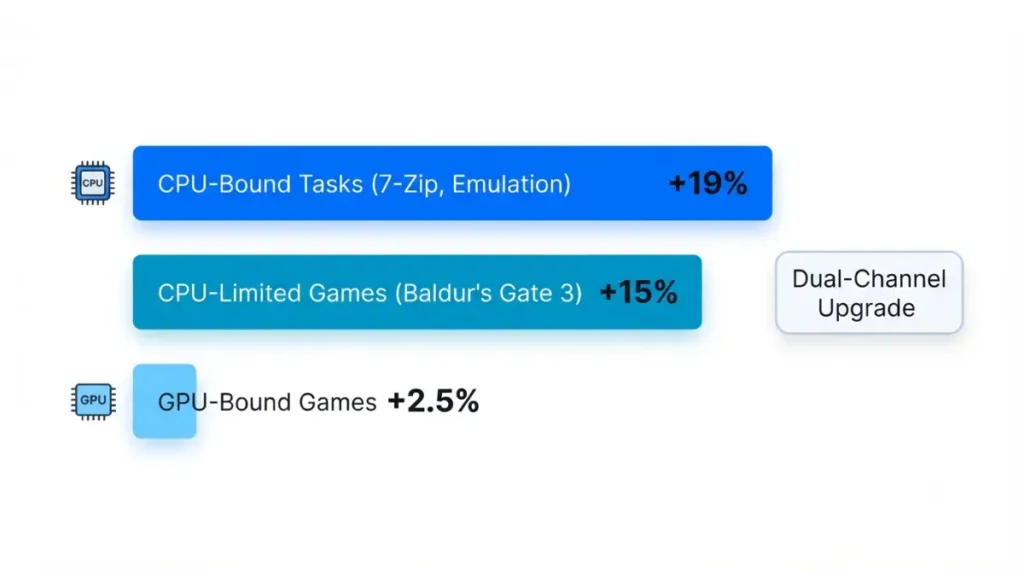
Upgrade only if you need more than 16GB or run CPU-bound work; in Gamers Nexus’s test the suite stayed within 16GB, so the gains came from channel mode, not capacity.
Gaming only: staying at 16GB
GPU-targeted tests gained about 2.5% on average in that one test, so stock memory costs little in GPU-bound games.
Mixed use: adding a matching module
CPU-limited work showed the largest gains. A matching second 16GB gives 32GB in dual-channel; how the Steam Machine RAM upgrade works covers the process.
What swapping to 2x8GB does and doesn’t change
It adds dual-channel at the same 16GB, with no capacity gain, and means removing the stock module. No test of that exact layout was found.
✅ Do This: Match your workload to one of the three cases above before opening the console.
How hard is it to replace Steam Machine RAM?
Replacing the memory is far more involved than swapping the SSD: iFixit’s Valve-collaborated RAM guide runs 49 steps against 11 for the SSD, per Mixed’s report on the iFixit guides.
Why the memory slots sit deep inside
Reaching them means removing the fan and power supply and disconnecting cables and antenna cables, per iXBT. Valve engineers said moving the slots would hurt signal integrity.
Before you open it
⚠️ Watch Out: The console contains a built-in power supply. Unplug it first, follow the guide exactly, and don’t service the power supply yourself. Ask Valve Support whether opening the unit affects your warranty.
The Steam Machine SSD upgrade is the far shorter job.
Is upgrading Steam Machine RAM worth it?
More system RAM leaves the GPU unchanged: the Steam Machine’s 8GB of GDDR6 VRAM is a separate pool.
What more RAM doesn’t change: the 8GB of VRAM
ETA Prime’s 64GB install showed about 62GB of system RAM and still 8GB of VRAM, per Korben. See the Steam Machine GPU equivalent and what its 8GB of VRAM limits.
Cost check before you buy
Valve cited memory supply for shipping one stick, and no prices are quoted here. Divide a kit’s price on the day you buy by the gigabytes it adds, then weigh that against your workload.
Steam Machine won’t boot after a RAM swap?
Two documented concerns apply after a swap: Gamers Nexus reported instability with some DDR5 SO-DIMMs, and Valve advises against mixing capacities, speeds or timings.
If it won’t boot or acts unstable
Compare the new module’s capacity, speed and timings with the stock module’s, since a mismatch is the documented concern. Ask Valve Support before reopening the console.
When to contact Valve Support
Give them the module’s capacity, speed and timings and what the unit does at power-on, and ask whether the repair is covered.
FAQ
1. What RAM does the Steam Machine come with?
The Steam Machine ships with one 16GB DDR5-5600 SO-DIMM, per Valve, leaving its second memory slot empty.
2. Does the Steam Machine come with 1x16GB or 2x8GB RAM?
One 16GB stick. Valve told Gamers Nexus it misspoke about two configurations; two 8GB sticks was its original plan.
3. How many RAM slots does the Steam Machine have?
Two SO-DIMM slots, with only one populated in every unit Valve has produced so far.
4. What RAM is compatible with the Steam Machine?
Valve recommends DDR5-5600 or faster SO-DIMMs with matching capacity, speed and timings; no tested-kit list was found.
5. Can I mix RAM sizes in the Steam Machine?
Valve advises against mixing capacities, speeds or timings, so match a second module to the stock one.
6. Does dual-channel RAM make the Steam Machine faster?
In one Gamers Nexus test, dual-channel gained up to 19.4% in CPU-bound work and about 2.5% in GPU-targeted tests.
7. Can the Steam Machine use 32GB of RAM?
Adding a matching second 16GB module gives 32GB in dual-channel; no Valve maximum capacity was found, so confirm larger sizes with Support.
8. Can the Steam Machine run 64GB of RAM?
ETA Prime ran 2x32GB at 5600 MT/s, but that is a third-party demonstration, not a Valve-confirmed maximum.
9. Is it hard to upgrade Steam Machine RAM?
iFixit’s guide takes 49 steps for RAM versus 11 for the SSD, as reported by Mixed; follow it exactly or contact Valve Support.
10. Will more RAM increase Steam Machine VRAM?
No. VRAM is a separate 8GB GDDR6 pool, and a 64GB install still showed 8GB of VRAM, per Korben.
Choosing your Steam Machine RAM
Match your second module to the stock one, and upgrade only if you need more than 16GB or run CPU-bound work. If the unit misbehaves after a swap, give Valve Support the module’s specs before reopening it. More limits are in Steam Machine specs and upgrade limits and the RAM upgrade process. We did not physically test this hardware; every spec traces to the cited sources.