
PSU for GPU wattage, from each card maker’s own spec page

PSU wattage for eight current GPUs, each from its maker’s own guide or spec page. NVIDIA based the RTX 5090’s 1000 W on a PC with a Ryzen 9 9950X.
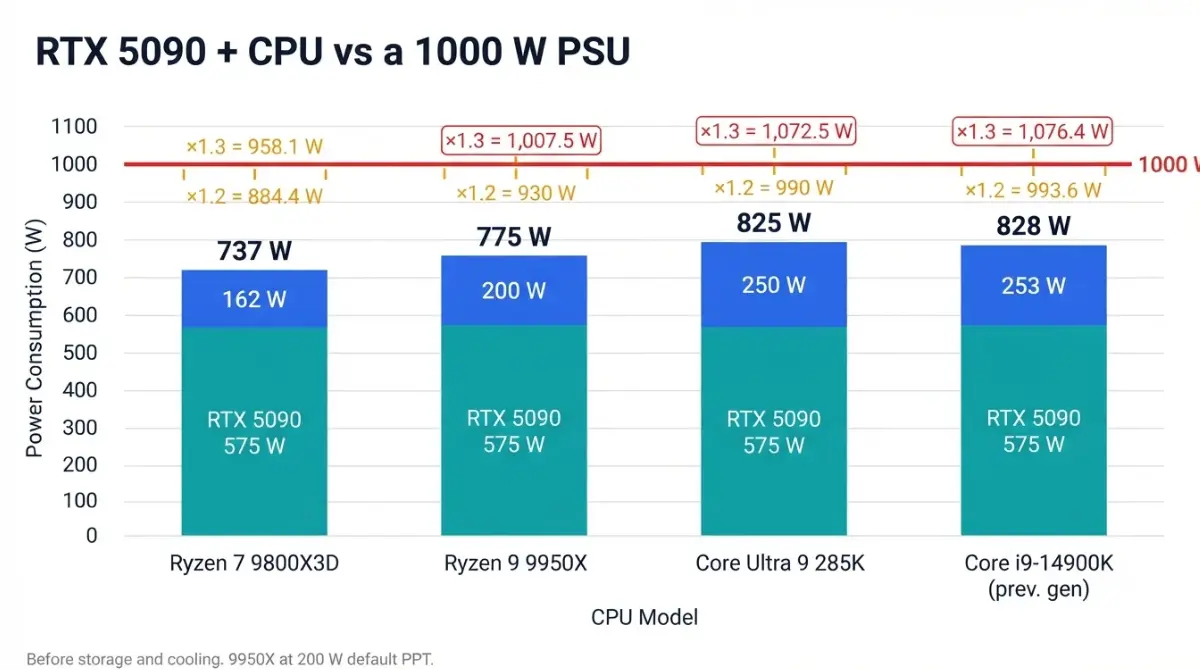
Table of Contents
Size your power supply to the figure published for your own board, because a partner card can ask for more than the GPU maker does. NVIDIA’s RTX 5070 quick start guide sets a 650 W minimum for its Founders Edition card, while PowerColor’s box for the RX 9070 XT Red Devil asks for 900 W against AMD’s 750 W for the same GPU.
The processor matters most beside an RTX 5090. NVIDIA’s 1000 W figure for that card assumes a Ryzen 9 9950X, ASUS’s table rises to 1200 W next to a Ryzen 9 or Core Ultra 9, and MSI’s overclocking figure reaches 1600 W.
Store listings and wattage sites print a spread of other numbers. Every figure below comes from the card or processor maker’s own document, or from a named review where the maker publishes none, with the sources under each table.
The wattage table, card by card
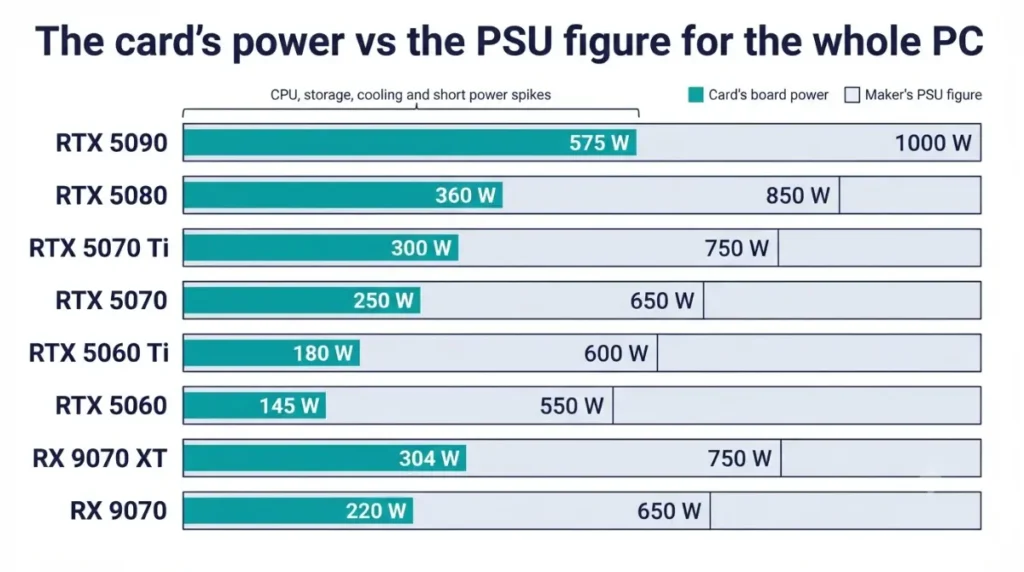
Each row pairs a GPU’s own board power with the system figure its maker publishes. The PSU figure covers the whole computer, not the card alone.
| GPU | Board power | Maker’s PSU figure | Source |
|---|---|---|---|
| GeForce RTX 5090 | 575 W | 1000 W | User guide |
| GeForce RTX 5080 | 360 W | 850 W | User guide |
| GeForce RTX 5070 Ti | 300 W | 750 W | Spec page |
| GeForce RTX 5070 | 250 W | 650 W | User guide |
| GeForce RTX 5060 Ti | 180 W | 600 W | Spec page |
| GeForce RTX 5060 | 145 W | 550 W | Spec page |
| Radeon RX 9070 XT | 304 W | 750 W | Spec page |
| Radeon RX 9070 | 220 W | 650 W | Spec page |
Sources: NVIDIA user guides, RTX 5090, RTX 5080 and RTX 5070; NVIDIA spec pages, RTX 5070 Ti and RTX 5060 Ti and RTX 5060; AMD spec pages, RX 9070 XT and RX 9070. Board power is NVIDIA’s Total Graphics Power and AMD’s Typical Board Power, both from the spec pages.
A board power of 304 W and a PSU figure of 750 W are not a contradiction. The gap is the allowance the GPU maker made for the CPU, storage, cooling and short power spikes. Seasonic’s wattage guide names the RTX 5090 as the only mainstream gaming card for which NVIDIA recommends 1000 W.
Why a Red Devil box asks for 150 W more
AMD rates the RX 9070 XT at 304 W and pairs it with a 750 W recommendation. PowerColor’s retail box for its Red Devil version prints 900 W, which Tom’s Hardware reported from a photo of the packaging, along with AMD’s Frank Azor confirming that other custom RX 9070 XT cards would carry lower requirements.
Each board maker writes its number for its own clocks and power limit, so one GPU name can carry two figures. When they differ, follow the one printed for the board you own.
Does your CPU change the number?

Seasonic’s sizing method adds the graphics card’s board power, the processor’s maximum power and the rest of the system, then multiplies the total by 1.2 to 1.3. For the CPU it uses PPT on AMD processors and Maximum Turbo Power on Intel ones.
Run that formula backward on each maker’s figure and it shows how much load the recommendation was built to carry, and how much of that is left once the graphics card takes its share.
| GPU | Maker’s PSU figure | Load it covers (÷1.3 to ÷1.2) | Left for everything but the GPU |
|---|---|---|---|
| RTX 5090 | 1000 W | 769 to 833 W | 194 to 258 W |
| RTX 5080 | 850 W | 654 to 708 W | 294 to 348 W |
| RTX 5070 Ti | 750 W | 577 to 625 W | 277 to 325 W |
| RTX 5070 | 650 W | 500 to 542 W | 250 to 292 W |
| RX 9070 XT | 750 W | 577 to 625 W | 273 to 321 W |
| RX 9070 | 650 W | 500 to 542 W | 280 to 322 W |
Calculated from the figures in the first table using Seasonic’s 1.2 to 1.3 multiplier, rounded to the nearest watt.
Every card except the RTX 5090 leaves at least 250 W for the processor, drives, fans and pump. The flagship leaves 194 to 258 W.
NVIDIA also names the processor behind its figures. The Required System Power line on each RTX 50 spec page carries a footnote: the minimum is based on a PC with a Ryzen 9 9950X. That chip’s default PPT is 200 W (HWBusters), so beside an RTX 5090 it uses most or all of that headroom before a drive or fan is counted.
Intel publishes Maximum Turbo Power on each processor’s spec page. AMD’s product pages give only TDP, so take PPT from a review of your chip or read it in AMD’s Ryzen Master utility on a running system. Add your drives, fans and any pump, compare that total with the last column, and step up one PSU size if it is larger. The processor draws its share through the EPS lead covered in which 24-pin and EPS power connectors a motherboard needs.
RTX 5090 power supply by CPU and board
The Core Ultra 9 285K’s Maximum Turbo Power is 250 W on Intel’s spec page, above the 9950X behind NVIDIA’s 1000 W. Run Seasonic’s formula forward on the RTX 5090’s 575 W and four processors, leaving out storage, cooling and the motherboard:
| Processor | Power limit | With a 575 W RTX 5090 | × 1.2 | × 1.3 |
|---|---|---|---|---|
| Ryzen 7 9800X3D | 162 W PPT | 737 W | 884.4 W | 958.1 W |
| Ryzen 9 9950X | 200 W PPT | 775 W | 930 W | 1,007.5 W |
| Core Ultra 9 285K | 250 W Maximum Turbo Power | 825 W | 990 W | 1,072.5 W |
| Core i9-14900K (previous generation) | 253 W Maximum Turbo Power | 828 W | 993.6 W | 1,076.4 W |
Sources: Intel spec pages for the Core Ultra 9 285K and Core i9-14900K; Ryzen 7 9800X3D PPT from Tom’s Hardware and LanOC; Ryzen 9 9950X PPT from HWBusters and The FPS Review. Multiplier from Seasonic.
Reviews split on the 9950X. Tom’s Hardware and PC Gamer list its PPT as 230 W, while HWBusters and The FPS Review give 200 W as the default. At 230 W the row becomes 805 W, 966 W and 1,046.5 W.
At Seasonic’s 1.3 margin, every row except the 9800X3D passes 1000 W before any storage or cooling is added.
Four makers’ figures for each CPU
NVIDIA gives one figure, 1000 W, built on the 9950X. MSI, ASUS and Corsair each publish a table by processor class, and they group processors differently, so each named chip sits in the column its maker uses for it.
| Processor | MSI, gaming | MSI, overclocked | ASUS | Corsair |
|---|---|---|---|---|
| Ryzen 7 9800X3D | 1000 W | 1300 W | 1000 W | 1000 W |
| Ryzen 9 9950X | 1000 W | 1600 W | 1200 W | 1000 W |
| Core Ultra 9 285K | 1000 W | 1600 W | 1200 W | Not named |
| Core i9-14900K | Not named | Not named | 1200 W | 1000 W |
Sources: MSI’s recommended PSU table, ASUS’s RTX 50 series PSU guide, Corsair’s recommended PSU table. “Not named” means that maker’s table has no column for the processor. MSI describes its overclocked column as real-world system power for overclocking.
ASUS’s 1200 W lines up with the 1.3 column above for the Ryzen 9 and Core Ultra 9. Corsair keeps 1000 W for every processor it names here.
RTX 5090 boards and their own figures
| Board | PSU figure | What the maker adds |
|---|---|---|
| NVIDIA GeForce RTX 5090 Founders Edition | 1000 W | 575 W Total Graphics Power |
| ASUS ROG Astral GeForce RTX 5090 OC | 1000 W | Based on a fully overclocked GPU and CPU |
| MSI GeForce RTX 5090 32G Suprim SOC | 1000 W | 600 W in Gaming mode, 575 W in Silent mode; ATX 3.1 PSU recommended |
| Gigabyte GeForce RTX 5090 Windforce 32G | 1000 W | One 16-pin power connector |
| Zotac Gaming GeForce RTX 5090 series | 1000 W | Card can draw up to 600 W; keep total load at 75% of the PSU’s rating as a rule of thumb |
| ASUS ROG Matrix GeForce RTX 5090 | 1600 W | Draws up to 800 W with a BTF motherboard and a 12V-2×6 cable |
Sources: NVIDIA RTX 5090 spec page, ASUS ROG Astral tech specs, MSI Suprim SOC specifications, Gigabyte Windforce specifications, Zotac’s RTX 5090 power guidance, ROG Matrix product page, with the Matrix’s 1600 W from ASUS’s PSU guide.
Every standard board repeats 1000 W, MSI’s Suprim SOC included at 600 W in Gaming mode. The ROG Matrix is the exception, because its second power input through a BTF motherboard lets the card draw up to 800 W.
Zotac’s 75% rule puts the comfortable load on 1000 W at 750 W, and the 9800X3D row already reaches 737 W.
Is 850 W enough for an RTX 5090?
NVIDIA’s own RTX 5090 page gives two answers. Its “Prepare your system” box gives an 850 W minimum with three PCIe 8-pin cables or one 450 W cable, while the spec table on the same page says 1000 W with four 8-pin leads or one 600 W cable. The box’s numbers match the RTX 5080, and the same box, still headed with the RTX 5090 name, also sits on the RTX 5070 family page.
The guide packed with the RTX 5090 asks for a 1000 W power rating minimum and at least four PCIe 8-pin cables. Go by that.
Wire only three of the four adapter inputs and the card holds a lower power limit, set out in the 12V-2×6 and 8-pin connector comparison.
An 850 W unit can carry an RTX 5090 only while the whole PC stays under 850 W. Tom’s Hardware warns that running a PSU at full load shortens its life, and for anyone keeping the smaller unit it suggests an 85 to 90 percent power limit on the card, about 500 W.
Two reviews of the Founders Edition found spikes past its 575 W rating. Tom’s Hardware measured spikes reaching 659 W in Cyberpunk 2077, counting only those that lasted 0.1 seconds or more. Igor’s Lab measured up to 900 W inside a single 20 ms capture sampled every 10 microseconds. They part ways on the fix: Igor’s Lab calls a 1000 W ATX 3.1 unit suitable, and Tom’s Hardware considers 1200 W fine while setting 1500 W as its target.
NVIDIA’s spec footnote recommends a PCIe CEM 5.1 compliant power supply, and MSI’s Suprim SOC page recommends ATX 3.1. Look for either on your PSU’s spec page before pairing it with this card.
Cables the wattage figure assumes
A power supply can meet the wattage and still fall short on cables. NVIDIA’s guides ask for “independent dedicated cables” from the PSU, and the count rises with the card.
| Founders Edition card | PSU minimum | 8-pin leads with NVIDIA’s adapter, at least | Or one 16-pin cable rated at least |
|---|---|---|---|
| RTX 5090 | 1000 W | Four | 600 W |
| RTX 5080 | 850 W | Three | 450 W |
| RTX 5070 | 650 W | Two | 360 W |
Sources: NVIDIA user guides for the RTX 5090, RTX 5080 and RTX 5070. NVIDIA’s RTX 5070 spec page accepts a 300 W or greater cable; the table follows the guide’s higher 360 W.
A unit rated 850 W with only two separate PCIe 8-pin outputs cannot feed an RTX 5080 through its adapter, even though its wattage matches. NVIDIA also tells Founders Edition owners to use only the adapter that ships in the box.
Stop if: your PSU has fewer separate PCIe cables than your card’s guide asks for. Don’t make up the count with splitters or a third-party adapter. Ask the PSU maker’s support which cable set fits your unit.
Which connector to use, and how a 16-pin plug seats, belongs to the 12V-2×6 and 8-pin connector comparison.
When the PC shuts down under load after a card swap
A PC that powers off mid-game once a new card goes in gets three checks, in this order.
- Compare the wattage on your PSU’s label with your board’s published figure.
- Confirm every PCIe cable is the PSU’s own and that the count matches the card’s guide. On a 16-pin plug, NVIDIA’s guide asks for it to be fully inserted and seated flush against the receptacle.
- If both match and the shutdowns continue, contact the PSU maker’s support with the PSU model and the card you installed.
Never open the power supply’s case to look inside; repairs belong to its maker. Seating the card and connecting its power in the first place is covered in how to install a graphics card.
Read your PSU label, then your card’s spec page
The sticker on the side of your power supply shows its rated wattage, so that is the first number to note. The second comes from wherever your board’s maker publishes it:
- NVIDIA Founders Edition cards: the System Power Supply line in the card’s user guide.
- ASUS cards: Recommended PSU on the Tech Specs tab, with the footnote beneath it.
- MSI cards: Recommended PSU (W) on the Specification tab, where the Power Connectors line says whether an ATX 3.1 PSU is recommended.
- PowerColor and other partner cards: the product’s spec page, or the system requirements printed on the box.
Before you buy: match the figure to the full board name, such as ROG Astral GeForce RTX 5090 32GB GDDR7, not only the GPU.
That spec page also gives the board’s length and slot width, which you can check against your case next with whether a graphics card will fit your case. The checks for the rest of the build are gathered in GPU compatibility with the PC you already have.
Found this helpful? See more of our guides on Google.
Want to see our guides first on Google?
